




Many business emails go unanswered for the same two reasons: the subject says nothing, and the request is buried in the third paragraph. The fix is a format, not better writing. This guide covers the format itself, part by part, then 12 examples you can adapt, then the other thing people mean by "business email": the address your messages come from.
TL;DR
- A business email has seven parts: sender name and address, subject line, greeting, opening line, body, call to action, and closing with a signature. The opening line states why you're writing.
- One email, one request. If you need three decisions, number them, and give the reply a deadline.
- Formal and everyday business emails share the same structure; only the greeting, sign-off and sentence length change.
- For addresses, pick one personal pattern (first.last@ is the safest) plus a small set of role addresses such as sales@ and support@, and decide now how you'll handle two people with the same name.
- If an email asks someone to move money, the format alone can't prove it's genuine. Confirm payment changes on a known phone number.
What counts as a business email?
The phrase covers two related things, and search results mix them up.
A business email is a message sent for work: to a client, a supplier, a partner or a colleague. It follows a predictable structure so the reader can see in seconds what you need and by when.
A business email address is the address those messages come from, on your company's own domain (anna@yourcompany.com) rather than a free one (anna.design88@gmail.com). The address is part of the format, because it's the first thing the recipient sees, before the subject line.
This guide covers both, starting with the message.
The business email format, part by part
Here are the seven parts in the order your reader meets them.
2. Tell us who will test the checkout
Anna Petrova · Project Manager, Your Company
1. Sender name and address
Your email client shows a display name next to your address. In the message header it looks like this:
Use your real first and last name as the display name, not "Admin", "Info" or your company's name alone, unless the email genuinely comes from a team inbox. A name the recipient recognizes gets opened. A generic one looks like a newsletter.
2. Subject line
The subject line is a summary, not a teaser. Phone mail apps cut long subjects off, so put the important words first.
- Weak: Quick question
- Better: Q4 invoice #1042: correct billing address?
- Weak: Update
- Better: Website launch moved to 20 Nov, approval needed by Friday
If the email needs action, say which action and when. If it's for information only, you can say that too: "FYI: new office hours from 1 December".
When a long thread changes topic, change the subject line. Searching for "contract renewal" six weeks later is much easier than scrolling through a thread titled "Re: Re: lunch?".
3. Greeting
Match the greeting to the relationship and the country, not to a rule.
- New external contact: "Dear Ms. Okafor," or "Hello Ms. Okafor,"
- Existing client or partner: "Hi Daniel,"
- Group: "Hi all," or "Hello team,"
- Name unknown: "Hello [Company] team," rather than "To whom it may concern"
Use a title only if you know which one the person uses; their own email signature usually tells you. For more options, see our guide to email greetings for every situation.
4. Opening line: the purpose
State why you're writing in the first sentence. "I hope this email finds you well" is optional; your reason for writing is not.
- "I'm writing to confirm the delivery date for order #5531."
- "Following our call on Tuesday, here's the proposal we discussed."
- "I need your approval on the revised budget by Thursday."
5. Body
Give the reader what they need to act, and nothing they don't.
- Keep paragraphs short. One to three sentences each; many business emails are read on a phone.
- Number multiple questions. People answer numbered questions one by one; they skip the third question in a paragraph.
- Name the attachment. "The signed contract is attached (Harbor-Pine-contract-v3.pdf)" helps the reader and reminds you to attach it.
- Put dates in an unambiguous form. "14 November" or "Nov 14" avoids the 11/14 versus 14/11 confusion across countries.
6. Call to action
End with one clear next step, an owner and, where it matters, a deadline.
- "Could you confirm by Wednesday 5 pm CET whether the new date works?"
- "If everything looks right, reply 'approved' and we'll start on Monday."
- "No reply needed. This is just to keep you in the loop."
That last line saves your reader time, and they'll notice.
7. Closing and signature
"Best regards", "Kind regards" and "Thanks" all work for business email. Save "Sincerely" for very formal emails, letters and job applications. Our guide on how to end an email professionally lists alternatives for different situations.
Keep the signature short: name, job title, company, one phone number and the website. A logo is fine; a banner, three social icons and an inspirational quote are not. See these email signature examples for layouts that survive being opened on a phone.
A complete business email example
Here's how the seven parts fit together:
To: Daniel Moreau <d.moreau@client-example.com>
Subject: Website launch moved to 20 Nov, approval needed by Friday
Hi Daniel,
The website launch is moving from 13 to 20 November, because the payment provider needs one more week to approve the new checkout.
To keep the new date, we need two things from you by Friday 13 November:
1. Approval of the final homepage copy (attached: homepage-copy-v4.pdf)
2. The name of the person on your side who will test the checkout on Thursday 19 November
Everything else is on schedule. If the 20th doesn't work for your team, let me know and I'll suggest an alternative.
Best regards,
Anna
Anna Petrova
Project Manager, Your Company
+372 5555 0100 · yourcompany.com
Count the decisions Daniel has to make: two, numbered, with a date. That's the format working.
Formal vs. everyday business email: same structure, different tone
The structure above doesn't change between a first email to a bank and a quick note to a colleague. The tone does.
| Element | Formal (new contacts, legal, finance, senior people) | Everyday (colleagues, existing clients) |
|---|---|---|
| Greeting | Dear Ms. Okafor, | Hi Daniel, |
| Opening | I am writing regarding your invoice dated 3 October. | Quick one on the October invoice. |
| Sentences | Complete, no contractions | Shorter, contractions are fine |
| Sign-off | Kind regards / Yours sincerely | Thanks / Best |
| Emoji and exclamation marks | None | Rare, if the relationship allows |
When in doubt, start formal and mirror the other person. If they reply with "Hi Anna" and a first-name sign-off, you can follow. For fully formal correspondence, see our formal email guide.
12 business email examples you can adapt
Each example uses the format above. Replace anything in [brackets].
1. Introducing yourself to a new contact
Dear [Name],
[Mutual contact] suggested I get in touch. I lead [role] at [Your Company], where we [what you do, in one line].
I'm writing because [specific reason this matters to them]. Would a 20-minute call next week be useful? I'm free [two time slots with time zone].
Kind regards,
[Signature]
2. Requesting a meeting
Hi [Name],
Could we meet for 30 minutes to agree on [specific decision]?
Two options that work for me:
- Tuesday 10 Nov, 10:00 CET
- Wednesday 11 Nov, 15:00 CET
If neither works, send me a time and I'll fit around it.
Best regards,
[Signature]
3. Following up when there's no reply
Hi [Name],
Following up on my email from [date] about [topic]. The one thing I need is [decision or answer], ideally by [date] so we can [consequence of the date].
If this has moved to someone else on your team, could you point me to them?
Thanks,
[Signature]
Wait at least three working days before the first follow-up, and add something useful each time rather than "just checking in".
4. Project status update

Hi all,
Summary: [on track / delayed by X days], [one-line reason].
Done this week:
- [item]
- [item]
Next week:
- [item]
Risk: [what could slip, what you're doing about it, what you need from them, if anything].
Best,
[Signature]
5. Sending a quote or proposal
Dear [Name],
Thank you for your time on [date]. As promised, our proposal for [project] is attached ([file name]).
In short:
- Scope: [one line]
- Timeline: [start] to [end]
- Price: [amount, currency, tax status]
The quote is valid until [date]. If you'd like to adjust the scope, I'm happy to walk through the options on a call.
Kind regards,
[Signature]
6. Invoice and payment reminder
Hi [Name],
A friendly reminder that invoice #[number] for [amount] was due on [date]. A copy is attached.
Payment details are unchanged from previous invoices. If it's already on its way, please ignore this message. If there's a problem with the invoice, let me know and I'll sort it out.
Thanks,
[Signature]
7. Notifying clients of new bank details
This is the email criminals most like to fake (more on that below), so a genuine one should tell clients how to check it.
Dear [Name],
From [date], our company bank account is changing. Before you update anything, please confirm the new details with us by phone on [number already on file / on our website], not by replying to this email.
We will never ask you to change payment details by email alone. If you receive a message that does, please call us before acting on it.
Kind regards,
[Name, title, signature]
8. Apologizing for a mistake
Dear [Name],
You received [what went wrong], and that's our error. I'm sorry for the trouble it caused.
We've already [action taken], and [replacement / refund] will reach you by [date]. To stop it from happening again, we've [process change].
If anything else is wrong with the order, reply to this email and it comes straight to me.
Kind regards,
[Signature]
9. Responding to a complaint

Dear [Name],
Thank you for telling us about [issue]. You're right that [the part they're right about].
Here's what happens next:
1. [Immediate step], today
2. [Fix], by [date]
3. I'll confirm with you once it's done
If you'd rather talk it through, call me directly on [number].
Kind regards,
[Signature]
10. Handing over a client to a new contact
Dear [Name],
From [date], [New person] ([email]) will be your main contact for [account/project]. I'm moving to [new role / leaving the company], and [New person] has been on the project since [date], so nothing will be lost.
Copied here so you have each other's details. For anything urgent before [date], you can still reach me.
Kind regards,
[Signature]
11. Declining a request politely
Hi [Name],
Thank you for thinking of us for [request]. We can't take it on this time because [short, honest reason].
[If true: What we could do instead is (alternative), or (person/company) may be a better fit.]
I hope we can work together on the next one.
Best regards,
[Signature]
12. Internal announcement to the team
Hi team,
From 1 December, expenses go through [tool] instead of email.
What you need to do by 25 November:
1. Log in to [tool] with your work account
2. Submit any open expenses from November the old way
Questions go to [name/role address]. The full guide is here: [link].
Thanks,
[Signature]
Business email address format: patterns and examples
The second meaning of "business email format" is the address itself. Choosing a pattern takes five minutes, but changing it later means updating every account, signature and business card.
Personal address patterns
| Pattern | Example | Works well when | Watch out for |
|---|---|---|---|
| first.last | anna.petrova@yourcompany.com | You expect to grow; easiest for outsiders to guess | Long surnames make long addresses |
| flast | apetrova@yourcompany.com | Short and common in larger companies | Collisions (Anna and Alex Petrova) arrive sooner |
| first | anna@yourcompany.com | Teams under ~15 people, informal brands | The second Anna |
| f.last | a.petrova@yourcompany.com | A middle ground between the two above | Same collision issue as flast |
| first.l | anna.p@yourcompany.com | Customer-facing roles where surnames stay private | Hard for outsiders to guess |
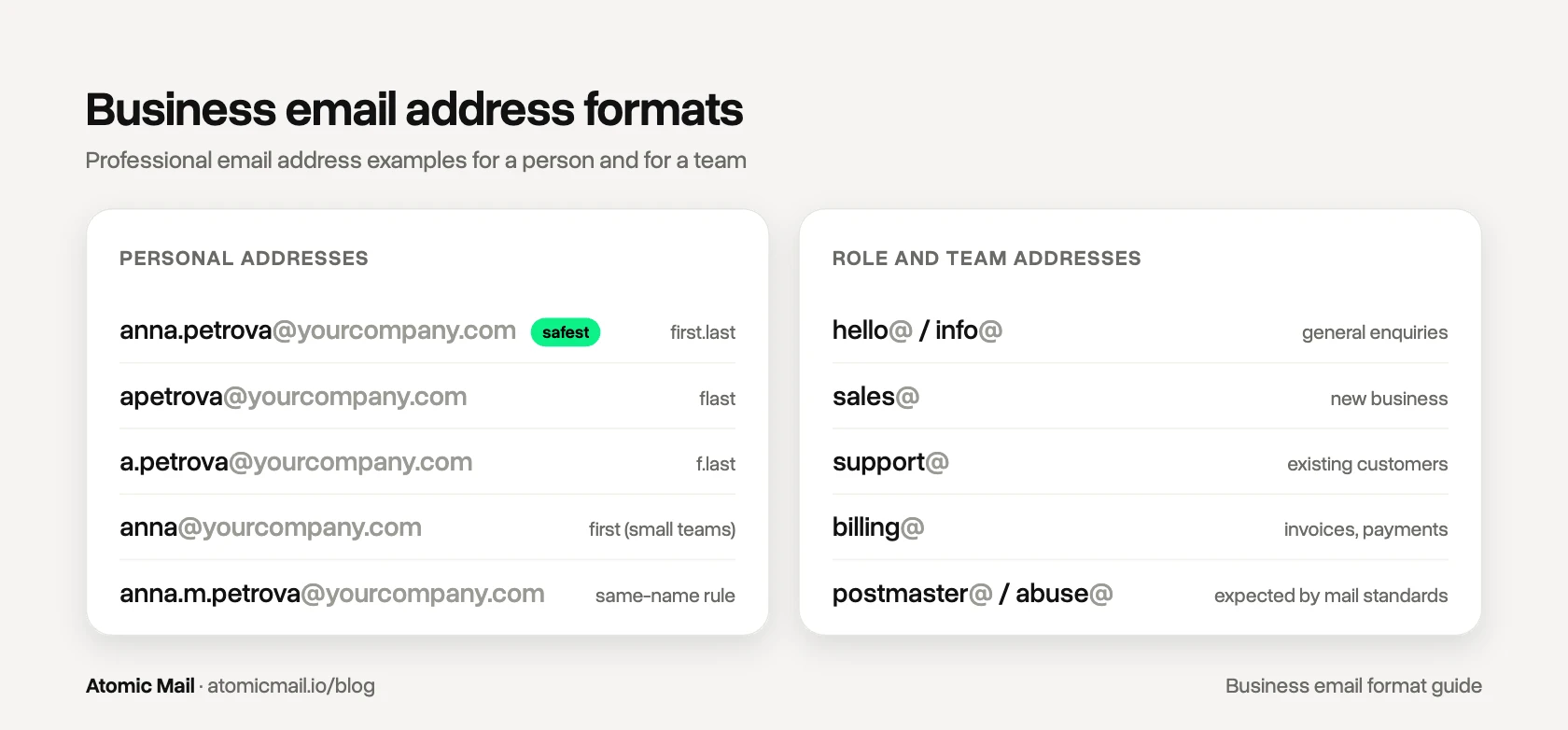
If you're not sure, choose first.last. It's the most predictable for outsiders, it handles growth, and it reads as a person rather than a department.
Role and team addresses
Role addresses belong to a function, not a person, so they survive staff changes. A typical small company needs only a few:
- hello@ or info@ for general enquiries
- sales@ for new business
- support@ for existing customers
- billing@ or accounts@ for invoices and payments
- careers@ or jobs@ for applications
- press@ for journalists
Two more are expected of any domain that handles mail. RFC 2142, the IETF specification for common mailbox names, defines postmaster@ for problems with your mail service and abuse@ for reports of spam or misuse from your domain. The core mail standard, RFC 5321, requires every mail domain to accept postmaster@. Make sure both reach a real person.
You don't need a separate paid mailbox for each role address. Most providers let you set them up as aliases that deliver into an existing inbox.
Naming rules that age well
- Use lowercase only. RFC 5321 technically allows the part before the @ to be case-sensitive, but it explicitly discourages relying on that. Mixed case just causes typos.
- Decide on duplicates now. Write down what happens when a second Anna Petrova joins: a middle initial (anna.m.petrova@) or a number. Deciding later means one person gets an inconsistent address.
- Simplify special characters. Turn "Zoë O'Brien-Smith" into zoe.obriensmith@ or zoe.obrien@. Apostrophes and accented letters are valid in some systems but break in others.
- Plan for name changes. When someone changes their surname, give them a new address and keep the old one as an alias for at least a year, so replies and old contacts still reach them.
- Stay well under the limit. The standard caps the part before the @ at 64 octets, which is 64 characters for a plain ASCII address. If yours is anywhere near that, the pattern is wrong.
- Never reuse a departed employee's personal address for someone new. Redirect it to their manager or a role address for a while, then close it.
For more on keeping usernames consistent, see our username guide.
Can a business email prove it's genuine?
Partly. A consistent format and a company domain make an email look trustworthy, which is exactly why criminals copy them.
The FBI's Internet Crime Complaint Center received 24,768 business email compromise complaints in 2025, with reported losses of just over $3 billion (IC3 2025 Internet Crime Report). The typical case isn't a hacked password. It's an ordinary-looking email from a supplier or an executive asking for a payment or a change of bank details.
Three habits protect both sides:
- Confirm money requests out of band. Any request to pay a new account, or to change payment details, gets checked by phone on a number you already had, never one from the email itself. The FBI's guidance on business email compromise recommends the same.
- Check the domain, not the display name. "Anna Petrova" can be typed into any free account. The part after the @ is harder to fake, as long as your domain has DMARC set up, but lookalike domains (yourcompany-billing.com, yourcornpany.com) exist precisely to slip past a quick glance.
- Tell your clients what you'll never do. The bank-details template above does this. A client who knows you'll never change bank details by email is much harder to fool.
On the technical side, three DNS records do the work: SPF lists the servers allowed to send for your domain, DKIM adds a cryptographic signature to each message, and DMARC tells receiving servers what to do with mail that fails those checks. Your email provider or IT person should set them up. Our guide to email spoofing explains how they work.
Setting up business email addresses for your team with Atomic Mail
If your team still writes from free personal addresses, the format advice above only goes so far. A client can't tell anna.design88@gmail.com from an impostor's anna.design89@gmail.com.
Atomic Mail Business gives each person an address on your company domain, with plans from $3 per user per month, billed monthly. Two parts of it are relevant here:
- Role addresses without extra seats. Set up sales@, billing@ and the rest as aliases, so they don't cost a mailbox each.
- Sensitive attachments to clients on any provider. Contracts and bank details can go out as a password-protected email that expires automatically, even if the client uses Gmail or Outlook. Share the password by phone, and the bank-details email from example 7 becomes much harder to intercept, while the call itself shows the client the email really came from you.
Mail between colleagues on Atomic Mail is end-to-end encrypted, so internal emails like the expense announcement in example 12 are readable only by your team.
Which format should you use? A quick answer
If you're writing to someone new, or about money, contracts or a complaint, use the formal version of the format and keep it to one request. If you're writing to a colleague or a client you talk to every week, keep the same seven parts and relax the tone. Either way, the reader should know what you need from the subject line and the first sentence.
For the wider craft of writing, from tone to proofreading, see our guide on how to write a professional email.
FAQ
What is the correct format for a business email?
Subject line, greeting, an opening sentence that states your purpose, a short body, a call to action with a deadline, and a closing with your signature. It's sent from an address on your company domain with your real name as the display name.
What are the parts of a business email?
Seven: sender name and address, subject line, greeting, opening line, body, call to action, and closing with a signature.
How long should a business email be?
Short enough to read on a phone without scrolling much: usually two to five short paragraphs. If it needs more, attach a document and summarize it in the email.
How do you start a business email?
With a greeting that matches the relationship ("Dear Ms. Okafor," for new contacts, "Hi Daniel," for people you know), then one sentence that says why you're writing.
Is "Hi" professional in a business email?
Yes, for colleagues and contacts you already work with. For a first email to a senior person, a bank or a legal contact, use "Dear" or "Hello" and switch to "Hi" once they do.
What is a good business email address format?
firstname.lastname@yourcompany.com is the safest choice: easy to guess, it scales as you grow, and it reads as a person. Add role addresses such as sales@ and support@ for functions that outlive any one employee.
What should a business email signature include?
Your full name, job title, company, one phone number and your website. Skip quotes, banners and long legal text unless your industry requires it.
What is an unprofessional email address?
Anything with nicknames, birth years, random numbers or a free provider's domain for company business (bestseller_88@gmail.com). Customers and spam filters both treat those with suspicion.
Should I use a template for business emails?
Yes, for recurring situations such as reminders, follow-ups and handovers. Change at least the first sentence and the request so the email is clearly written for this recipient.
When should I use CC and BCC?
CC people who need to know but don't need to act. Use BCC when emailing many external people who shouldn't see each other's addresses. Our guide to CC and BCC covers the details.


.jpg)