×Atomic Mail

Atomic Mail

Productivity

Get
Products
↓
Email
Atomic Mail
Secure encrypted email
Atomic Mail for Agents
Email API for AI agents
Atomic Workspace
Business email & teams
Privacy
Atomic VPN
Private VPN service
Atomic Wallet
Secure, anonymous crypto wallet
Sigma Browser
Private AI browser
AI Tools
Atomic GPTAtomic GPT
Atomic GPT
Private AI chat
Atomic Chat
Local & open-source AI super chat
Atomic Agent
Local-first AI agent
Atomic Bot
One-click AI agent runner
Features
↓
Alias creation
End-to-end encryption
Zero access encryption
Recovery with seed phrase
Private AI assistance
Business
Download
Get for Windows
Get for iOS
Get for Android
Get for macOS
Get for Linux
All downloads
PricingBlogContact usSupport
Sign InSign Up
Download app
EnglishEspañolDeutschFrançaisPortuguêsहिन्दी
Sign inCreate a free account

Free Email Without a Phone Number

Create a free email without a phone number. Just pick a username and password. No tracking, no data collection, no ads.

This address is already in use
@atomicmail.io
Thank you! Your submission has been received!
Oops! Something went wrong while submitting the form.
Atomic Mail free email inbox, created without a phone number
Free plan

What the free plan includes

Every Atomic Mail account starts on the Free plan. To sign up you only need a first name, a username and a password.

Phone numberNot requiredNo phone and no backup email at signup
Price$0Every account starts on the Free plan
StorageUnlimitedNo mailbox quota to manage
Email aliases10 free15 on the Plus plan
EncryptionEnd-to-endZero-access, AES-256 and ECIES; TLS 1.3 in transit
Account recoverySeed phraseYou save it at signup. We never store it.
Attachments25 MBPer file
Ads and trackingNoneYour inbox is not used for advertising
Create a free accountCompare plans
Step by step

How to create an email without a phone number with Atomic Mail

Sign-up takes about two minutes. These are the real screens you'll see.
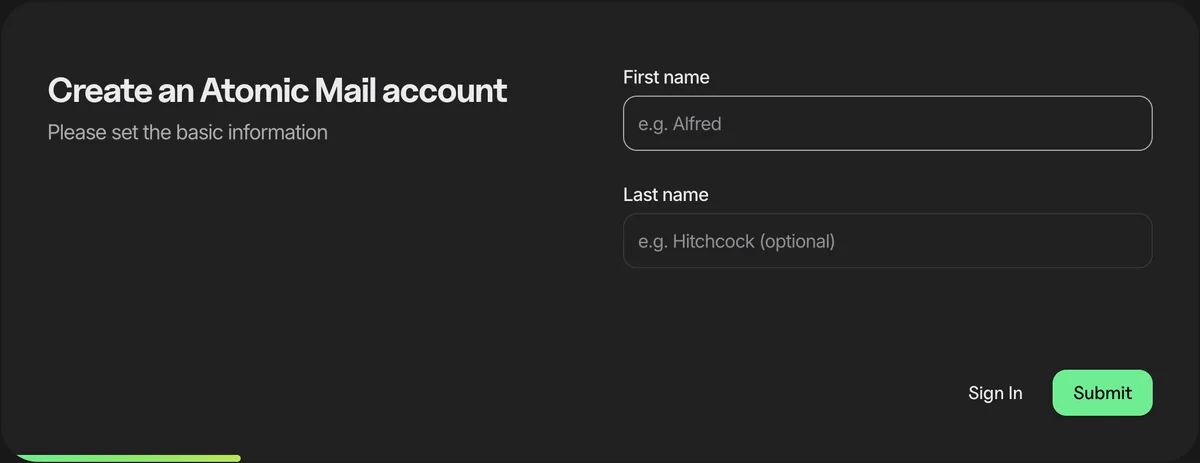
  1. 1

    Enter your name

    Open the sign-up page and type a first name. The last name is optional.

    Atomic Mail sign-up screen asking for a first name and an optional last name
  2. 2

    Pick your address

    Choose the part before @atomicmail.io. You can use letters, numbers and periods.
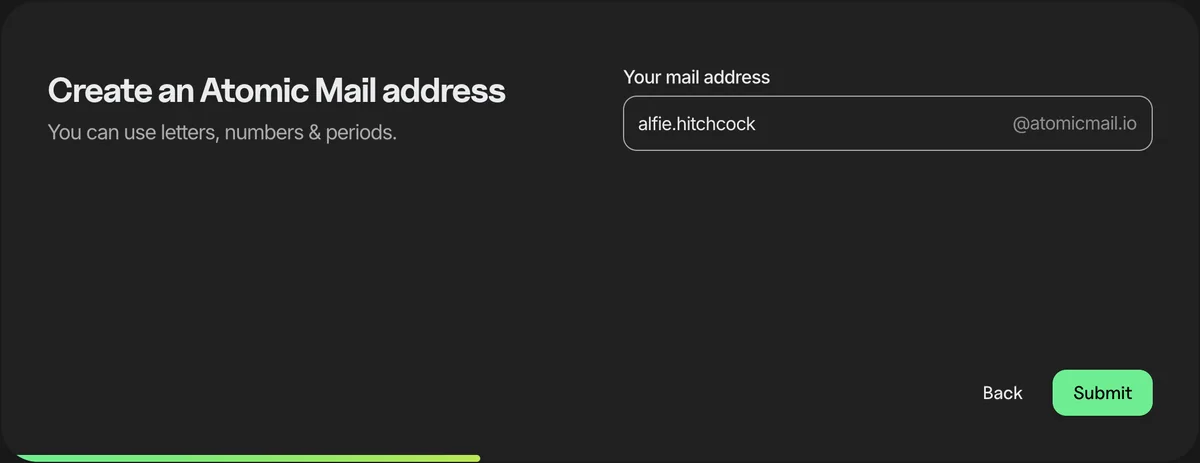
    Choosing an @atomicmail.io email address during sign-up
  3. 3

    Create a password

    Use a long passphrase or a password manager. There is no phone number field and no SMS code at any point.
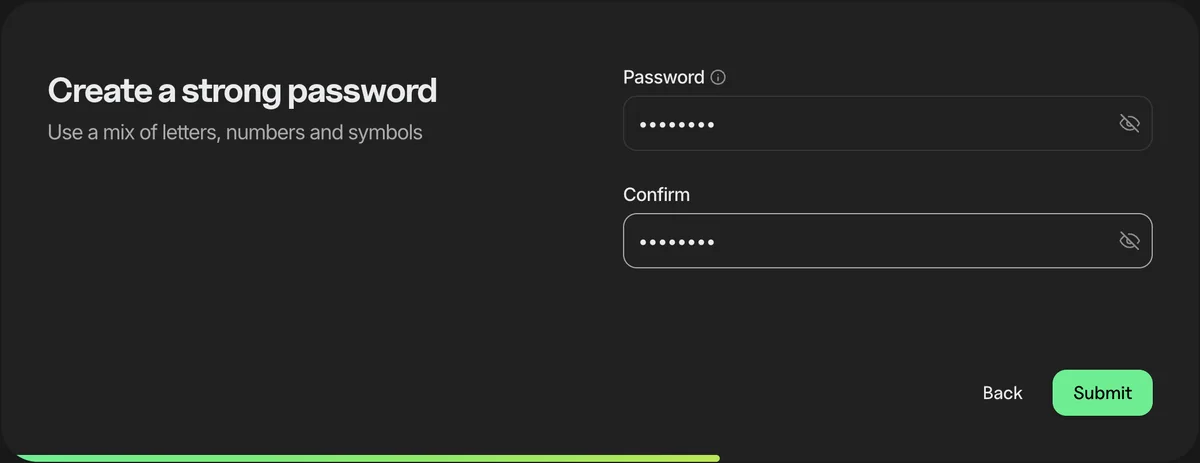
    Create a strong password screen with password and confirm fields
  4. 4

    Save your seed phrase

    You get a 12-word recovery phrase. Download it or write it down and keep it private: it's how you get back in if you forget your password. You may also be asked to solve a quick picture puzzle to prove you're human.

    Words hidden in this screenshot.
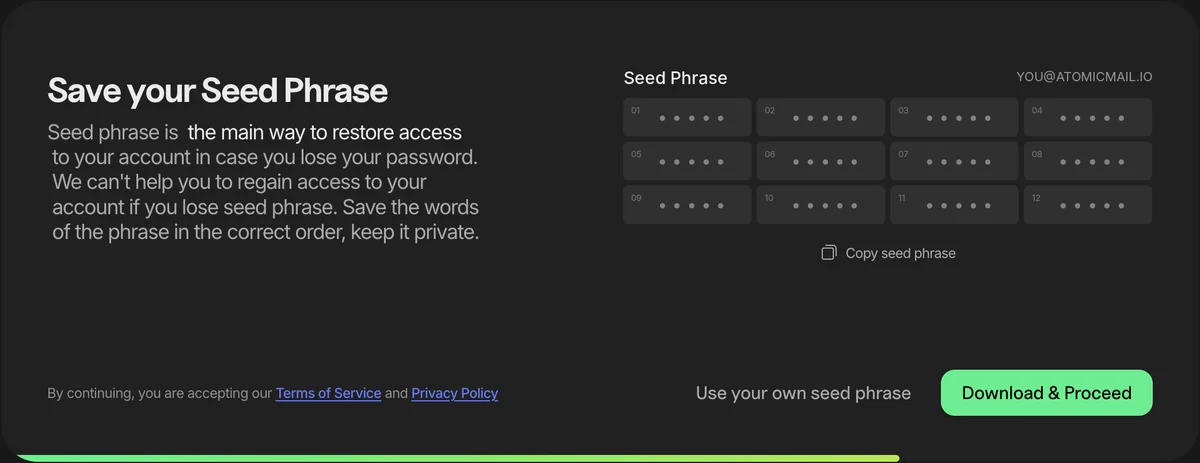
    Save your seed phrase screen showing a 12-word recovery phrase, words hidden
  5. 5

    Add a recovery email, or skip it

    This step is optional. Skip it if you don't want any other address linked to your account.
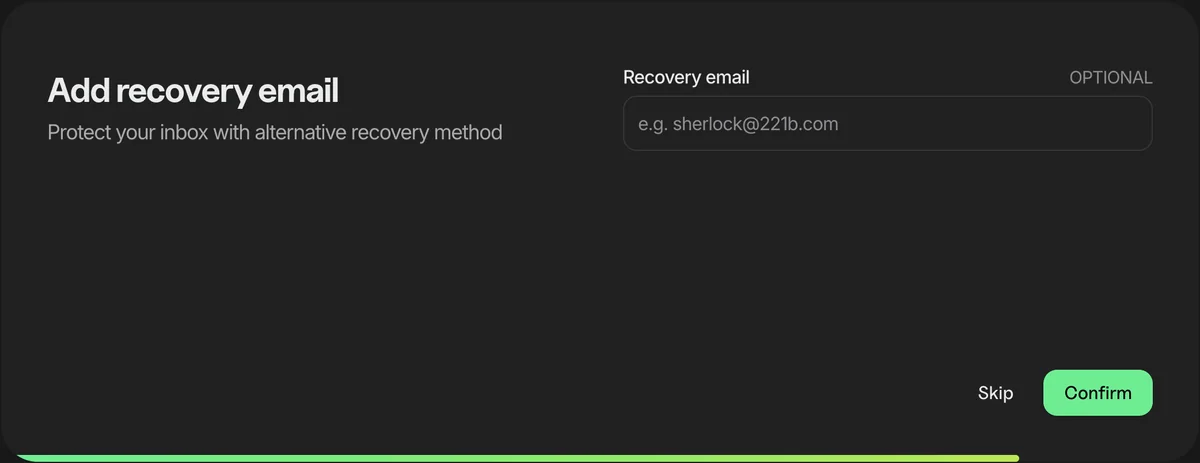
    Optional recovery email screen with Skip and Confirm buttons
  6. 6

    You're in

    Your account is ready. Sign in and start sending encrypted email from the web or the apps.

    Welcome to Atomic Mail screen confirming the account was created
Create your free account
Comparison

Free email providers compared

What the best-known free email services ask for when you sign up, and what you get without paying.

ProviderPhone number at signupFree storageNo adsEnd-to-end encryption
Atomic MailNot requiredUnlimitedYesYes
TutaNot required1 GBYesYes
Proton MailSometimes1 GB2YesYes
GmailOften15 GB1NoNo
Outlook.comSometimes15 GBNoNo
Yahoo MailTo verify the account1 TBNoNo
GMXFor recoveryUp to 65 GBNoNo
mail.comFor recoveryUp to 65 GBNoNo

1 Shared with Drive and Photos; some new accounts get 5 GB until a phone is added. 2 500 MB until account setup is done. Gmail, Outlook.com and Proton Mail decide case by case whether to ask for a phone.

Sources: providers' help and pricing pages, checked November 2026. Logos are trademarks of their owners.

Phone verification

Why do Gmail and Outlook ask for your phone number?

Big providers use your number to stop spam bots and to recover accounts. That works for them, but it ties your inbox to your real identity.

Atomic Mail never asks for one.Sign up with a name, username and password. Recover your account with a seed phrase only you hold.

Create a free account

Can you create a Gmail account without a phone number?

Often asks

Sometimes. Google may show a Skip option, but it says phone verification is sometimes required to prove you're a real person. When it is, there's no way around it.

Source: Google Account Help, "Verify your account"

Does Outlook.com need a phone number?

Sometimes

Not always. Microsoft may ask for one if a signup looks unusual, and some new accounts must verify by phone before they can send their first email.

Based on Microsoft's signup flow and support answers

Why sharing your phone number is a risk

Account takeover

It links your inbox to your name. If it's your recovery method, a SIM swap (tricking a carrier into moving your number) lets an attacker reset your password.

Sources: FBI public service announcement (2022), FCC SIM-swap rules (2023)

Benefits of an email account without a phone number

Creating a free email without phone number helps protect your identity, reduces digital exposure, and simplifies your online experience. Here's why skipping phone verification is a smarter, safer choice:

Less data tied to you: No phone number means fewer breadcrumbs that point back to your identity. Your account and inbox stay truly private.

Separation from your real life: Keep sign-ups, newsletters, and work/life profiles apart from your personal phone number and offline identity.

Instant sign-up: No SMS codes, no waiting, no failed verifications while traveling. Pick a username, set a password, and you’re in.

Fewer security risks: Remove a common attack path. Phone-based takeovers (like SIM-swaps or number recycling) will no longer be a concern.

Smaller breach footprint: The less personal data you share, the less there is to leak. Avoiding phone number verification reduces exposure in the event of a future breach.

Why Atomic Mail

Why people choose Atomic Mail

Privacy features built into every account, including the free one.

Private by default

End-to-end and zero-access encryption on every message.

No personal data

No phone number, real name or backup email needed.

Email aliases

Extra addresses that keep your main inbox hidden.

Self-destructing messages

Set a timer and sensitive emails disappear on schedule.

Seed phrase recovery

Get back in with a phrase only you hold.

GDPR-compliant

Built to meet strict EU privacy law.

No ads, ever

A clean inbox with no ad tracking.

Unlimited storage

Keep every email without managing quotas.

Every platform

Web, iPhone, Android, Mac, Windows and Linux.

Our users say it better

I’ve been using Atomic Mail for a few months, and it’s the best anonymous email service I’ve tried. Great design, the encryption is solid, and the ability to send anonymous emails without worrying about privacy is priceless.
Rob N.
Rob N.
Not sharing my phone number matters. Atomic Mail let me open an account without it and keep my info to myself. Very rare ability nowadays, so highly appreciate it.
Steeve L.
Steeve L.
As a freelancer, I value privacy when communicating with clients. Atomic Mail lets me send emails without worrying about exposing my real email or personal data. The zero-access encryption feature is a huge plus though!
Lara D.
Lara D.

Email without a phone number: FAQ

Can I really create an email without a phone number?

Yes. With Atomic Mail, you can create an email account without a phone number, real name, or backup email. We believe privacy should be the default, not an option.

What's the best free email without phone number?

Atomic Mail and Tuta don't ask for a phone number at signup. Proton Mail, Gmail and Outlook.com sometimes do, depending on their spam checks, and Yahoo Mail asks for one to verify the account. Atomic Mail is the one that combines no phone number with unlimited free storage and 10 free aliases.

How do I sign up for an email without phone number verification?

Simply go to Atomic Mail sign up page, choose a username, set a password, and you're done. No phone number, no verification codes, and no personal data required.

Is it safe to use an email address without phone number?

Absolutely. In fact, using an email without linking your phone number can enhance your safety by reducing the risk of identity leaks, SIM-swapping attacks, and unwanted data collection.

How does Atomic Mail recover my account without a phone or backup email?

We use a secure seed phrase for account recovery – a modern private method inspired by crypto wallets. You can store your auto-generated phrase or create your own for full control and safety.

Is Atomic Mail really anonymous?

Yes. We do not collect any personal information. You can create a new email without phone number, name, or alternate address – offering a high level of anonymity and security.

What’s the difference between Atomic Mail and Gmail or Yahoo?

Unlike Gmail or Yahoo, Atomic Mail doesn’t ask for your phone number, track your data, or display ads. It’s a privacy-first email service without phone number requirements, built for users who value anonymity.

Are there any limits when I create a free email without phone number?

The Free plan includes unlimited storage, 10 aliases, encrypted messages and self-destructing emails, with no phone number required. Attachments can be up to 25 MB each, and there is a daily sending limit that adjusts automatically to stop spam. Paid plans add more aliases, Hide My Email addresses and AI tools.

Is Atomic Mail really free?

Yes. The Free plan costs $0 and every account starts on it. It includes the full mail app, encrypted email, unlimited storage and 10 aliases. Paid plans start at $5 a month and add extras such as Hide My Email addresses, 15 aliases and AI writing tools. You don't need them to send and receive email.

App Store
Google Play
Try the most secure email now for free!
This address is already in use
@atomicmail.io
Thank you! Your submission has been received!
Oops! Something went wrong while submitting the form.
Atomic Mail

Private, end-to-end encrypted email. No phone number needed.

support@atomicmail.io

Apps

All downloadsiPhoneAndroidMacWindowsLinuxWeb app

Business

Business EmailBusiness plans

Free tools

DMARC CheckerDMARC GeneratorEmail Domain CheckerEmail Header AnalyzerSubject Line TesterSignature GeneratorAll Free Tools

Features

Email AliasEnd-to-End EncryptionZero-Access EncryptionSeed Phrase RecoveryEmail Without Phone NumberAI Email AssistantAI Email Writer

Compare

GmailProton MailOutlookYahoo MailiCloud MailFastmailZoho MailTuta MailMailfencePosteoStartMailHushmail

Learn

Secure EmailEncrypted EmailPrivate EmailAnonymous EmailAd-free EmailGDPR Compliant EmailFree EmailFast EmailPersonal EmailCrypto Email

Company

AboutPricingFAQPress KitEmail for AI agentsPrivacy PolicySecurity WhitepaperTerms of Servicellms.txt

© 2026 Atomic Mail. All rights reserved.

AtomicMail Systems OÜ, Harju maakond, Tallinn, Kesklinna linnaosa, Harju tn 3 // Vana-Posti tn 2, 10146

English·Español·Deutsch·Français·Português·हिन्दी