

TL;DR
- Email marketing is still a top channel in 2026 because you own the relationship, control the cadence, and can automate conversion + retention.
- A working email marketing strategy is a system: Goals → Infrastructure → Segments → Lists → Copy → Design → Compliance → Delivery → KPIs → Optimization.
- Most failed email marketing campaign results come from trust and deliverability issues, not weak copy or bad design. Get SPF/DKIM/DMARC, list hygiene, and complaints under control.
- Use segmentation and lifecycle flows (welcome, nurture, triggers, re-engagement) so your email marketing management isn’t “blast and pray.”
- The best email marketing tools help, but email marketing best practices (permission, relevance, testing, clean data) decide whether you land in inbox or spam.
What Is Email Marketing
Email marketing is permission-based messaging sent to subscribers (or customers) to sell, educate, onboard, retain, or re-activate.
How email marketing works
Here’s the simplified mechanics of email marketing:
- List creation: You attract users who want to hear from you (using lead magnets or sign-up forms).
- Message deployment: You use email marketing software to send relevant content (not just ads, but value).
- Conversion: The reader clicks a link and performs an action (buys, reads, or downloads).
- Retention: You keep the conversation going, turning a one-time buyer into a loyal advocate.
Why email marketing still pays ROI in 2026
Email’s edge is boring, and that’s why it works. It’s addressable, automatable, measurable, and not hostage to an algorithm.
Some numbers from 202-2025:
- Average ROI often cited: ~$36 to $45 for every $1 spent (over 3,500% return).
- Worldwide email traffic is massive: ~347B emails/day.
- Benchmark engagement: average open rate around ~43.46% in 2025.
Email Marketing Types
Different goals, different flows. A great email marketing strategy uses a mix of these formats.
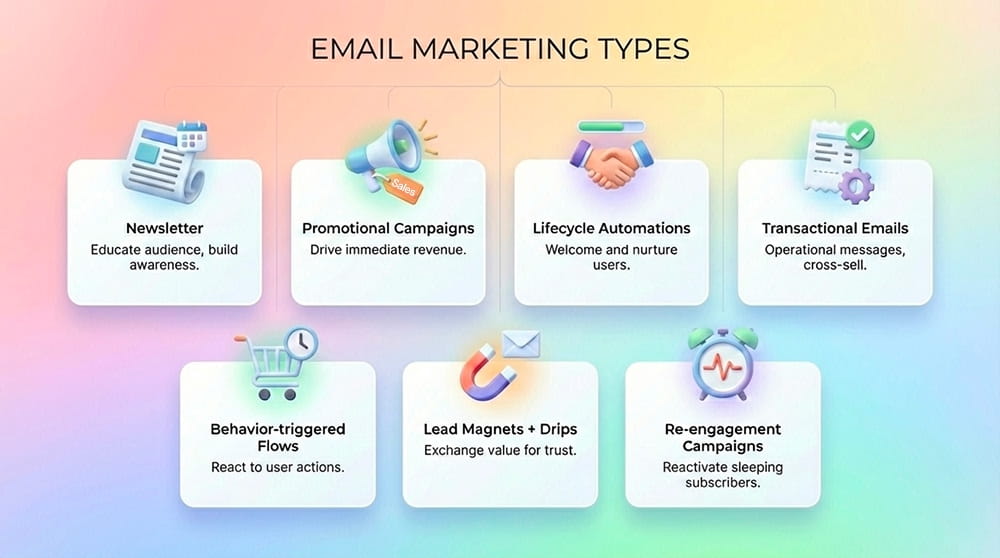
- Newsletter – A weekly or monthly digest that educates your audience and keeps your brand top-of-mind without being aggressively "salesy."
- Promotional campaigns – Focused, time-sensitive blasts announcing product launches, seasonal sales, or exclusive bundles to drive immediate revenue.
- Lifecycle automations (welcome, onboarding) – Automated sequences that trigger when a user joins your list (Welcome Series) or learns your product (Onboarding), nurturing them while you sleep.
- Transactional emails – Operational messages (like receipts, shipping confirmations, and password resets). They have the highest open rates, so smart brands use them to subtly cross-sell.
- Behavior-triggered flows – Emails fired by events (page views, cart activity, time since purchase). They remind users of forgotten items, offer timely discounts on replenishments, or lure back winbacks with exclusive perks.
- Lead magnets + drip sequences – Common in B2B and SaaS, this involves giving away a free resource (like an ebook) in exchange for an email, followed by a "drip" of educational content to build trust.
- Re-engagement campaigns – A strategic attempt to wake up "sleeping" subscribers who haven't opened your emails recently, asking them if they still want to stay connected before you clean your list.
Pros And Cons Of Email Marketing
Email marketing is very powerful, but every technology has a trade-off.
Pros
- High ROI + cost efficiency – Drop $1, get $36. Once your list exists, each additional send is cheap. A single well-built automation can outperform dozens of single emails.
- Ownership – You control the audience connection. This stability allows for long-term forecasting and the building of lifetime value (LTV) models. That’s why mature teams treat list-building as part of email marketing management, not “lead gen.”
- Targeting & automation – Sophisticated email marketing tools allow for segmentation that goes far beyond demographics. Marketers can trigger automatic messages based on "micro-moments" – such as a user browsing a specific product category three times in a week, or abandoning a cart.
- Measurable outcomes – Clicks, conversions, revenue, churn reduction. You can tie email marketing campaign performance to business reality.
Cons and challenges
- Attention economy + competition – Everyone is in the inbox. Without sharp positioning and consistent value, your email marketing becomes background noise.
- Deliverability risk – Without proper encryption and authentication (like SPF/DKIM), your beautiful email marketing campaign might end up in the Spam folder.
- Fatigue – Too many sends (or too many irrelevant sends) trains people to ignore you.
- Strict compliance – GDPR, GDPR, CAN-SPAM, and CCPA are complex laws; one wrong move with data privacy can lead to huge fines and reputation loss.
- List decay – Data decays at a rate of approximately 22% per year as people change jobs, abandon old addresses, or simply lose interest. This makes an 'always-on' approach to acquisition and list hygiene essential to maintain equilibrium, let alone growth.
How To Get Started With Email Marketing (Fundamental Steps)
If you’re new to email marketing, don’t start by designing pretty templates. Start by building a system.
The email marketing system looks like this:
Goals → Infrastructure → Segments → Lists → Copy → Design → Compliance → Delivery → KPIs → Optimization
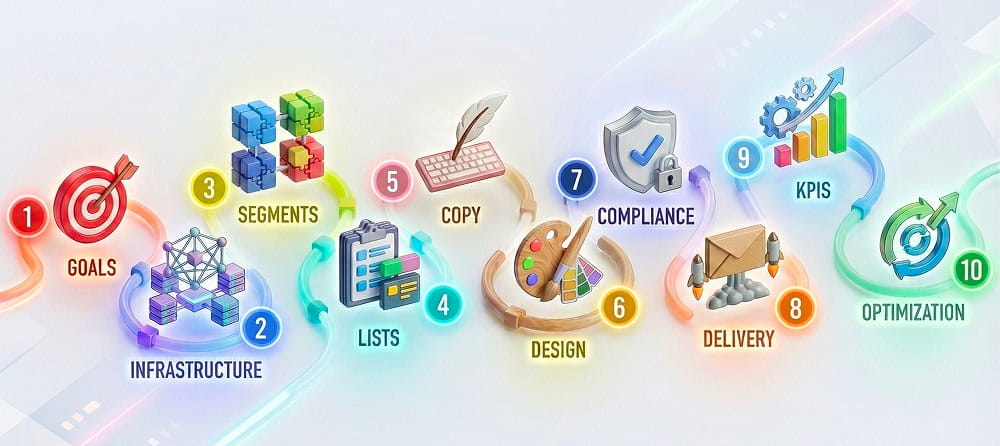
That’s the spine of any durable email marketing strategy. Skip one step and the whole email marketing campaign breaks.
Now let’s go step by step.
🎯 #1. Goals
A lot of email marketing management fails here because the goal is “send more emails.” That’s not a goal. That’s a symptom.
- How to set it: SMART style. Specific (10% revenue lift), Measurable (track 500 conversions via UTM pixels), Achievable (double staff hours, not 10x overnight), and so on. Ask: What's the win?
- KPI definition: Use KPIs that match the goal. Are you chasing Open Rates (Brand Awareness), Click-Through Rates (Traffic), or Conversions (Revenue)? If you want sales, measuring "opens" is a vanity metric. Focus on the click. Pick 3 max per email marketing campaign.
- Campaign type: Match goal to type. Awareness? Newsletters. Sales? Promos. Retention? Winbacks.
⚙️ #2. Infrastructure And Deliverability
Weak setup tanks everything. Pick rock-solid email marketing tools first.
What email marketing services to use
Minimum viable stack for email marketing:
- ESP (sending + automation) – one of your core email marketing tools
- CRM/CDP (customer data, lifecycle stage)
- Analytics (events, revenue, attribution)
- Optional but powerful: dedicated sending domain/subdomain (clean separation from your main domain)
If you’re handling sensitive comms (logins, 2FA), split streams. Marketing and security mail shouldn’t share reputation.
Deliverability essentials
Getting into the inbox is a technical discipline governed by authentication.
- SPF: A DNS list of approved IP addresses authorized to send your email. Without it, spoofing gets easier.
- DKIM: A digital signature that proves the email hasn't been tampered with.
- DMARC: The policy that tells receivers what to do if SPF/DKIM fail (e.g., reject the email). It is now mandatory for high-volume senders.
Note: In 2026, without these three, Google and Yahoo will likely block you entirely.
- Domain warming: New domains must scale slowly. Start with 20-50 trusted emails/day and gradually increase volume over 4 weeks to establish a positive reputation with ISPs.
👥 #3. Audience Segmentation
Start with a simple segmentation ladder:
- Demographics: the basics. Age, location, gender, job title
- Lifecycle stage: new subscriber → engaged reader → customer → inactive
- Intent signals: visited pricing, clicked “features,” downloaded a guide
- Purchase behavior: first-time buyer, repeat buyer, high AOV, churn-risk
- Preferences: topics selected, frequency chosen (yes, ask them)
📋 #4. Building An Email Marketing List
The quality of the email list is the ceiling of campaign performance. However, the simple "Sign up for updates" is no longer a compelling value proposition.
- How to build effectively: Popups with lead magnets (e.g., "Privacy checklist PDF"). Gamification (e.g., "Spin-to-win" wheels for discounts). Social CTAs. Web forms. Referral Programs. Affiliate swaps. Aim 1-2% daily growth.
- Clean subscriber lists: Scrub bounces weekly (ZeroBounce tool). Enable Sunset Policy:
- 30 Days Inactive: Move to "At Risk" segment.
- 60 Days Inactive: Send Re-engagement campaign.
- 90 Days Inactive: Stop emailing.
- 6 Months Inactive: Delete from list.
Reasoning: Continuing to email "ghosts" lowers the aggregate open rate, signaling to Gmail that the sender is irrelevant, which pushes future emails to spam for everyone.
📝 #5. Email Marketing Copy
Frameworks first – lean on one of these:
- AIDA (Attention, Interest, Desire, Action): The classic funnel. Hook them, build interest, create desire, and ask for the click.
- PAS (Problem, Agitation, Solution): Highly effective for B2B. Highlight a pain point, make it feel urgent (agitate), then offer your product as the relief.
- BAB (Before, After, Bridge): Show their current bad state, the ideal future state, and your product as the bridge.
Most common structure
- Subject line: Use curiosity ("You're missing this..."), urgency ("24 hours left"), or direct benefit ("Save 50% on security").
- Preheader (40 chars): This is the snippet visible next to the subject line. Tease meat, expand subject, no repeats.
- Hook: The first sentence has one goal: make them read the second sentence.
- The body (value): Keep it punchy. Use short paragraphs, bullet points, and "you-focused" language.
- CTA: Make it a boss button, not just a link. Make it look clickable. Use action verbs
- Footer (trust signal): A legitimate physical address and an easy Unsubscribe link are mandatory.
Important nuances
- Prefer concrete language over hype.
- Reduce spam triggers: ALL CAPS, excessive punctuation, misleading urgency, and words like "Free!!!", "Cash,", etc.
- Write like you’d write to one person, because that’s how inboxes feel.
🎨 #6. Email Marketing Design And Visuals
Design doesn’t win by being pretty. It wins by being readable at 8:12 AM on a cracked phone screen.
- Mobile-first layout: 60-70% of opens happen on mobile. Use a single-column layout (600px wide) and fat buttons.
- Visual hierarchy: Guide the eye. Big Headline → Short explanation → Big Button.
- Accessibility: Use high-contrast colors (no light grey text on white backgrounds). Always add "Alt Text" to images.
- Plain-text vs. designed: Plain-text: 40% higher opens (trust signal). Designed: Visuals boost clicks 20%. Test both for your specific goals and audience.
- Dark mode: A huge percentage of users view emails in Dark Mode. Ensure your transparent PNG logos don't disappear against a dark background.
- AMP for email: Interactive carousels, forms inside the inbox. May lift engagement, but raises complexity and support requirements.
- Visuals: 600px max width images. GIFs under 1MB. Compress via compressors.
- Brand identity: Always place your logo clearly at the top (header) and the bottom (footer). No stock images ever – custom screams brand.
- Secondary actions: For SaaS or mobile products, include "Download on the App Store/Google Play" badges to drive app installation directly from the inbox.
- Social proof & links: Add small, non-intrusive social media icons in the footer to allow users to verify your community presence without distracting from the main goal.
⚖️ #7. Permissions And Compliance
- Key laws: Familiarize yourself with GDPR (EU), CAN-SPAM (US), and CASL (Canada). Depending on where you operate, also check local rules.
- Consent done right:
- Single Opt-in: They type their email, they are on the list. Fast, but leads to fake emails and spam traps.
- Double Opt-in: They type their email, receive a confirmation link, and must click it to join. We highly recommend this. It ensures a clean, engaged list of humans who actually want to be there.
- Permission UX: Show clearly what subscribers will receive and how often. Keep checkboxes clear (no trick wording). Make unsubscribe simple (hiding it increases complaints).
📨 #8. Delivery
- Schedule sends at optimal times: Use email marketing tools to identify when your specific audience is awake and active (B2B is often Tuesday-Thursday mornings; B2C is evenings/weekends).
- Monitor real-time: Watch your campaign for the first hour. If bounce rates or complaint rates spike, pause immediately – something is broken.
- Handle bounces: Hard bounces (invalid emails) must be removed instantly; soft bounces (full inbox) get one retry, then they are out.
📊 #9. Analytics And Optimization
Data is the difference between guessing and growing.
- What to track:
- Deliverability: Did it arrive? (Target: 99%+)
- Engagement: Did they Open and Click? (Target: 30% Open, 2-5% CTR)
- Revenue: Did they buy? (The only metric your CFO cares about).
- Retention: Did they stay subscribed?
- Your KPIs
- A/B testing: Test Subject Line A vs. Subject Line B on 10% of your list, then auto-send the winner to the remaining 90%.
- Cohort thinking: Analyze groups, not just averages. Does the "2024 Holiday Cohort" spend more than the "2025 Summer Cohort"? Treat them differently.
- Post-send checklist: After 24 hours, review the data, tag the active users, and document the learnings for the next sprint.
Don’ts In Email Marketing
These are the fastest ways to poison deliverability, trust, and your brand.
- ❌ Buying lists: Never do it; it violates GDPR, destroys your sender reputation, and fills your database with "spam traps."
- ❌ Bait-and-Switch: Never write a subject line like "Your Order Status" for a promotional sales email – you will lose trust forever.
- ❌ Over-emailing: blasting your list daily without segmentation is the fastest way to burn out your audience.
- ❌ Ignoring authentication: Sending without SPF/DKIM in 2026 is practically asking Google to block your domain.
- ❌ Hiding unsubscribe: Making it hard to leave is illegal and results in users marking you as spam out of frustration.
- ❌ Data hoarding: Don't collect phone numbers or birthdays if you don't need them; it increases security liability.
- ❌ Insecure transmission: Don’t send passwords, secrets, or private customer details in plain email.
- ❌ Using public URL shorteners: Generic shorteners are frequently used by malware distributors and are often blocked by corporate firewalls and ISPs.
- ❌ Sending attachments: Never attach a PDF or Zip file directly to a marketing email – it is a massive security red flag; always link to a secure landing page instead.
2026 Trends In Email Marketing
2026 is less about “clever copy” and more about trust, data discipline, and durable systems.
- Zero-Party Data Strategy: Asking users directly for preferences (e.g., "What products do you like?") to replace third-party cookies.
- Unified omnichannel: Email synced with SMS and social ads. If a user ignores an email, they get an SMS; if they ignore that, they see a retargeting ad.
- AI as a helper: Using AI not just to write copy, but to predict exactly when a specific user is most likely to buy.
- Sustainability: Digital carbon footprints matter; cleaner code and smaller image files reduce the energy cost of your campaigns.
- Interactive experiences: Users will book appointments, take surveys, and shop directly inside the email widget without ever opening a browser.
- Brand safety: With AI-generated phishing on the rise, verified emails will become the only trusted form of business communication.
- Voice assistant optimization: As more people ask Siri or Alexa to "read my emails," copy is shifting toward conversational, spoken-word rhythms to sound natural when read aloud by AI.
FAQ: Email Marketing Questions
Is email marketing still effective in 2026?
Yes, email marketing still outperforms most channels for retention and repeat revenue, because you own the relationship and can automate it. The win comes from permission + deliverability + relevance.
How often should I send email marketing campaigns?
Start with consistency, not aggression: 1 newsletter/week plus key automations is enough for many brands. Frequency should be segmented – your engaged cohort can handle more than your cold cohort, and good email marketing management reflects that.
What are the most important metrics in email marketing?
Deliverability first (complaints, bounces, inbox placement), then engagement (clicks/replies), then revenue and retention. Opens can be useful directionally, but they’re noisy – modern email marketing tools and privacy features make them less reliable.
What’s a “good” open rate or click rate in 2026?
There’s no universal “good” because benchmarks vary by industry, list quality, and segmentation. However, a healthy target is around 20-25%.
How do I avoid the spam folder?
Use authentication (SPF, DKIM, DMARC), keep complaints low, and maintain list hygiene – this is core email marketing best practices. Also: send to engaged segments first, and don’t resurrect dead lists with a giant blast.
Do I need double opt-in for email marketing?
Not always, but double opt-in is a strong move when list quality matters, signups are risky (lead magnets, giveaways), or deliverability is shaky. It’s slower growth, cleaner reputation – often a net win for an email marketing campaign.
Is buying an email list ever okay?
No. Bought lists damage deliverability, spike complaints, and undermine trust. It’s the fastest way to turn email marketing into spam, and it hurts every future email marketing campaign.
How do I grow an email marketing list fast without being shady?
Offer something specific that solves a real problem (template, calculator, mini-course), then make signup frictionless. Fast growth that survives requires clear consent and strong value – classic email marketing best practices.
What are the biggest mistakes in email marketing management?
Ignoring deliverability signals, blasting unsegmented lists, and letting automations rot for months. Email marketing management is maintenance: hygiene, testing, segmentation, and tightening the message every cycle.
How to recover inactive subscribers?
Run a re-engagement email marketing campaign (Missed you" blast with survey + incentive), then sunset (suppress) those who don’t respond. Keeping dead weight hurts inbox placement and makes your metrics lie.