

TL;DR
- Phishing is a scam that impersonates trusted brands or people to steal your passwords, money, data, or access, usually through a phishing email.
- A phishing attack follows a chain: target → research → lure → infrastructure → delivery → execution → exploit.
- Modern phishing looks legit because attackers use OSINT, past breach data, and AI to make messages feel personal and highly convincing.
- Spot it fast: check the real From address, distrust urgency, hover links, watch for Reply-To/domain mismatches, and treat payment changes + unexpected files as hostile.
- Prevent it with boring habits: a "human firewall" (skepticism), technical hygiene (2FA, password managers), and a secure infrastructure.
- The ultimate shield is privacy: Big Tech providers are massive targets that mine your data. Switching to a private provider like Atomic Mail gives you privacy and anonymity, encryption, and zero-access architecture, making you a far more difficult and less attractive target for attackers.
What Is Phishing?
Phishing definition
Phishing is when an attacker pretends to be someone you trust (a bank, your boss, your delivery company, IT support) to push you into doing a specific action.
This action depends on the goal of attackers.
Key phishing goals
A phishing attack usually aims for one of four prizes:
- Credentials: Usernames and passwords (the keys to the kingdom).
- Financial theft: Direct wire transfers or credit card numbers.
- Data exfiltration: Client lists, trade secrets, or embarrassing personal photos for blackmail.
- Device access: Installing malware (like ransomware) that holds your digital life hostage.
Why email is the #1 delivery channel
Email wins for attackers because it’s cheap, scalable, and believable.
- One phishing email can be sent to 100,000 inboxes in minutes.
- Email has “built-in trust signals”: sender names, logos, signatures, thread replies.
- Email is connected to everything: password resets, account recovery, invoices, approvals.
If your email account gets compromised, it is not just one account – it is a direct path to your private conversations, external logins, password resets, and your entire life online.
How Does Phishing Work?
To defend against phishing, you must understand the enemy's workflow.
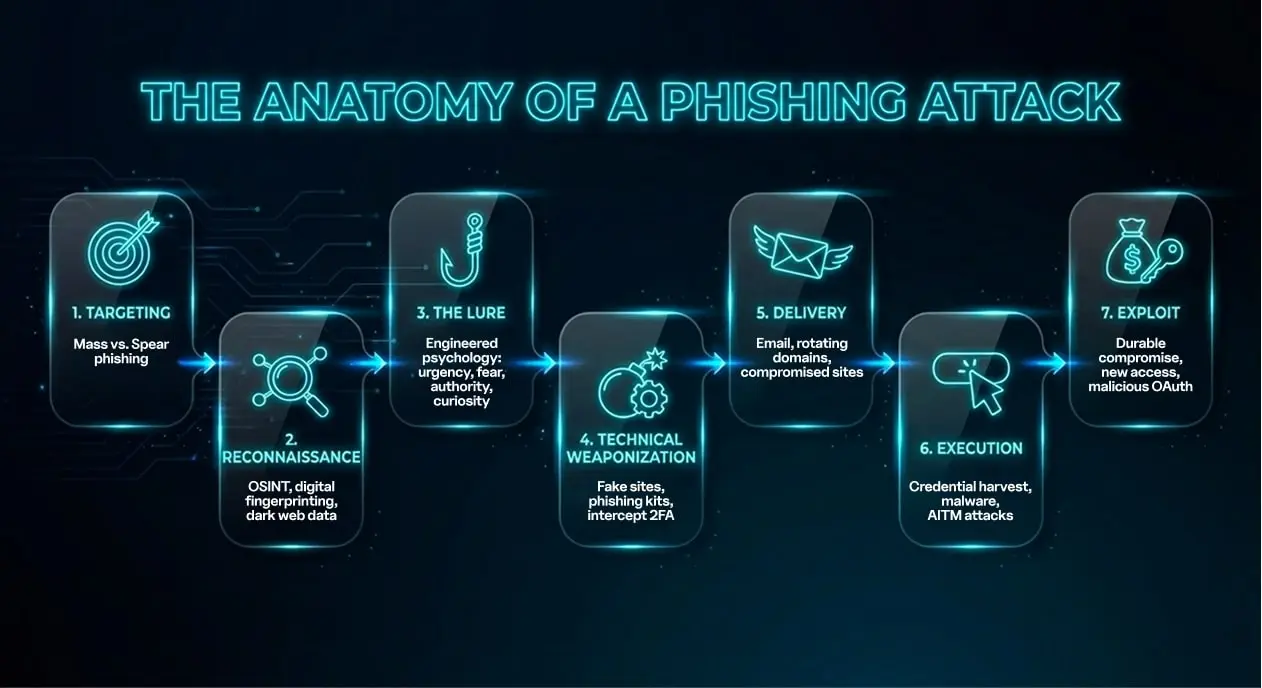
🎯 Step 1: Targeting
Mass phishing is volume: one phishing email template, sent to thousands. Spear phishing and whaling are the opposite – fewer targets, higher hit-rate, because the message is built around you.
🔍 Step 2: Reconnaissance and intelligence gathering
Modern phishing starts with thorough research. Attackers use open-source intelligence (OSINT) for social media mapping (who talks to whom, etc.) and digital fingerprinting (e.g., does the company use Microsoft 365 or Google Workspace?). Then they mix in dark web breach data for credential stuffing that makes a phishing email feel extremely personalized.
🎣 Step 3: The lure
The lure is engineered psychology: urgency and fear (“suspicious login”), authority (“CEO request”), curiosity (“document shared”) – buttons that push people to act before thinking.
💣 Step 4: Technical weaponization
Now they build the hook: look‑alike domains, homoglyph tricks, and “https” pages that look legitimate. Off‑the‑shelf phishing kits (Phishing‑as‑a‑Service) can clone real login portals and even help intercept 2FA, while polymorphism mutates subjects/HTML/attachments to slip past filters.
📨 Step 5: Delivery
Email is still the main cannon, but delivery gets slippery: rotating domains/IPs, hosting fake pages on compromised legit sites, and mixing channels.
🖱️ Step 6: Execution
Once a user interacts, attackers harvest credentials or deploy malware. Advanced Adversary-in-the-Middle (AiTM) attacks can even intercept Multi-Factor Authentication (MFA) tokens in real-time.
💰 Step 7: Exploit
The attacker instantly seizes your money or data, but they also may dig in for the long haul. They establish persistence by creating hidden inbox rules or authorizing malicious apps, allowing them to lurk in your account even after you change your password.
Types Of Phishing Attacks
Phishing is a family of scams that all share the same skeleton: a story that feels urgent, a link or attachment that feels “normal,” and a moment where you hand over something valuable. Here are key types of phishing attacks:
- Bulk email phishing: A broad phishing attack: one generic phishing email blasted to thousands, betting that a small percent will click.
- Spear phishing: A highly targeted phishing attack aimed at you (or your team), written with personal context so the phishing email feels legit.
- Whaling: A "Spear Phishing" attack aimed at "big fish" – executives, founders, finance leads – to steal high-level secrets or authorize massive wire transfers.
- Business Email Compromise (BEC): The attacker hijacks a legitimate corporate email account (or spoofs a vendor) to send fake invoices or request sudden payment changes.
- Clone phishing: Attackers copy a real message you’ve already received, but swap the safe link/attachment for a malicious one, resending it as an "updated version."
- Smishing (SMS) and vishing (voice): Phishing moves to your phone – smishing uses text messages, while vishing uses voice calls (often robocalls) to extract data.
- Angler/social media phishing: A phishing attack that pretends to be customer support on social platforms: “DM us your login,” “verify your account,” “fill this form.”
- Search engine phishing: Attackers could buy ads or game SEO so a fake login page outranks the real one. You click a search result, land on a clone, and the phishing attack steals credentials before you realize you were never on the real site.
- QR phishing (“quishing”): Malicious QR codes embedded in PDFs or physical stickers that bypass email filters and force you to scan with your unprotected mobile device.
- OAuth consent phishing: This phishing attack tricks you into granting a shady app access to your mailbox, files, or contacts.
The Rise Of AI And Deepfakes In 2025–2026
The biggest change in the world of phishing is the use of Artificial Intelligence as a weapon. 2025 saw AI change from a theoretical threat to a dominant operational tool for cybercriminals.
The death of "broken English": Large Language Models (LLMs) like WormGPT let attackers to create flawless, native-level emails in any language, complete with corporate jargon and perfect tone.
Stats: Since the advent of ChatGPT, phishing volume has increased by over 4,000% in some sectors.
Deepfake vishing (voice cloning): It now takes only 3 seconds of your voice (lifted from a social media or voicemail) to clone it. Attackers can call your finance department, sounding exactly like you, demanding an urgent wire transfer.
Hyper-personalization at scale: AI can scrape thousands of LinkedIn profiles instantly, generating 10,000 unique, personalized emails that reference the victim's specific job history, hobbies, and recent location.
Human vs. AI Phishing Comparison
Global Impact And Statistics (2024-2025)
The size of the phishing problem becomes clear when you look at the shocking statistics that show how dominant it is as a cybercrime vector.
- Daily volume: Around 3.4 billion phishing emails are sent daily – 1.2% of all global email traffic.
- Organization impact: 57% of organizations face phishing attempts daily or weekly.
- AI surge: Phishing volume increased by 4,151% after the release of widespread generative AI tools.
- Financial institutions are he most targeted sector (27.7% of attacks) due to direct access to funds.
- SaaS/Webmail: 17.7% of attacks target credentials for services like Microsoft 365 and Google Workspace, which serve as master keys to corporate data.
Financial costs
The Real Dangers Of Phishing
We often think of phishing as a little financial annoyance. If only it were that simple.
- Personal impact: drained accounts, identity theft, locked-out email. One phishing email can hand over your password, MFA code, or session token, and your bank, socials, and subscriptions aren’t yours anymore. Worst case, you lose your email account, and with it the reset links to everything else. Add the terrifying realization that a stranger has been watching your life.
- Business impact: payroll diversion, vendor fraud, ransomware entry points. A phishing attack can redirect payroll, swap vendor bank details, or get a foot in the door for ransomware without a “hacky” looking exploit. Finance and IT are popular targets because one approval or one login can unlock the whole building.
- The hidden cost: trust loss, legal exposure, downtime, reputational damage. The psychological trauma. Victims report deep shame, anxiety, and a loss of trust in digital communication, often hesitating to open even legitimate emails from friends or colleagues.
How To Spot Phishing Emails: A Practical Checklist
You don’t need paranoia, but you need a repeatable routine. Red flags that matter most:
- From address mismatch: Don't trust the display name. Hover your mouse cursor over the sender's name or click the small arrow next to "to/from" to expand the details.
- Urgency trap: “IMMEDIATE ACTION REQUIRED” + threats (lawsuit, closure, suspension in 24 hours) = phishing. Real companies don't panic, they notify.
- Mismatched link: Hover over the button (don’t click!). If the button says "Login to Bank of America" but the URL preview shows bit.ly/secure-login-77, it’s a scam.
- Context gap: If the request doesn’t fit the person (CFO “on vacation,” unusual tone, weird hour), verify out-of-band.
- Unexpected attachments: Invoices, “secure messages,” ZIPs, password-protected files – anything you didn’t expect.
- Payment/account changes: New bank details, updated payout info, “urgent transfer,” new beneficiary.
- Too-perfect branding + tiny flaw: Everything looks polished… except the domain is off by one character.
- Reply-To trick: From looks normal, Reply‑To points somewhere else.
- Credential/MFA grab: Any request for your password, recovery phrase, or “read me the code you just received.”
- Unusual login flow: “Verify to view” or “Sign in to download” for a file you never asked for.
- Pressure to bypass process: “Don’t tell anyone,” “skip approvals,” “I’m in a meeting, just do it.”
- Odd file types for the ask: “Invoice” as an .exe/.js/.iso, or a macro-enabled Office file.
- Too many redirects: You click once and the URL jumps through multiple domains before landing.
- Look‑alike sender domain: Extra words, swapped letters, or weird subdomains like security.yourcompany-support.com.
Phishing Prevention Guide
To stop phishing, you need a "Defense in Depth" strategy, with organizational policies, technical controls and individual behaviours all working together.
Personal safety basics
- Unique passwords + password manager: stop reuse so one phishing attack doesn’t unlock five accounts.
- MFA everywhere: prefer authenticator apps or hardware keys; SMS is better than nothing but easier to intercept.
- Turn on login alerts: If you get a “new sign-in” you didn’t initiate, treat it as an active phishing situation.
- Compartmentalize with aliases: Different identities for banking/shopping/newsletters = smaller blast radius.
- Harden recovery: Lock down recovery email/phone and ditch weak “security questions” attackers can guess.
- Audit connected apps: Remove shady OAuth access – consent phishing can bypass passwords entirely.
- Update fast: Browsers and office apps are common phishing follow-ups; patches shut doors.
Email-level defenses
- Don’t open unexpected files.
- If it’s a link, type it yourself: Open a new tab and enter the real domain (or use a bookmark), not the phishing email.
- Kill inbox stealth: Review forwarding rules and filters so phishing can’t hide security alerts.
- Reduce auto-trust: Disable remote image loading if possible – less tracking, fewer “pixel tricks.”
- Report fast: Forward suspicious messages to your security/admin flow.
Team / business playbook (entrepreneurs & orgs)
- Anti-BEC process: payment verification rules: any bank-detail change gets verified via a second channel, every time.
- Access control: least privilege + separate admin accounts: don’t let one phished inbox become an all-access badge.
- Training: short drills, real examples, no shame culture: people report phishing faster when they’re not afraid of being mocked.
- Incident response: who does what in the first 30 minutes: decide roles now – containment, comms, resets, and vendor/customer notifications.
- Out-of-Band Verification: if someone gets an email asking for money, call the person. Use a different channel (phone, Slack) to verify the request before sending a cent.
The secure email – why your email provider matters so much
Big-name inboxes are frequent phishing targets: Traditional email providers (like Gmail or Outlook) are the biggest targets on earth. They store massive amounts of metadata about your identity, location, and behavior – data that hackers are desperate to mine.
A private email provider changes that: With Atomic Mail, you get a smaller, tighter surface area and more ways to contain damage.
- A private account that doesn’t tie to your real identity: Less personal data in the profile = less ammo for phishing.
- Secure aliases: Create separate aliases for different activities (shopping, signups, work, banking) so your main inbox stays out of the blast zone.
- End-to-end + zero-access encryption: You can encrypt messages end-to-end (even when emailing traditional providers). Zero access means even we can’t decrypt your encrypted content.
- Seed phrase recovery: Private, attacker-resistant recovery. No “send a reset link/code” flow for someone to intercept from a phishing email.
🔐 Create a free Atomic Mail account and start protecting your data with aliases, encryption, and private recovery.
FAQ
What is phishing?
Phishing is a scam where attackers impersonate a trusted person or brand to trick you into giving up passwords, money, or access. It usually arrives as a phishing email, but it can also come via SMS, social media, or calls.
What might be a phishing message?
Any message that pushes you to click, log in, pay, or “confirm” something fast (especially if you weren’t expecting it) can be phishing. Common disguises: delivery updates, password resets, invoices, account alerts, and “support” requests.
Can you get hacked just by opening a phishing email?
Usually, simply opening a phishing email isn’t enough – the damage happens when you click a link, open an attachment, or enter credentials. That said, rare “zero‑click” exploits exist, so keeping your device and apps updated matters.
What’s the difference between phishing and malware?
Phishing is the trick (the persuasion). Malware is the tool (software that steals data, locks files, or gives remote access), and phishing often delivers it via attachments or fake downloads.
What is spear phishing?
Spear phishing is a targeted phishing attack crafted for a specific person or team, using personal or workplace context to sound extremely convincing.
How to spot phishing emails?
Do the quick scan: check the real sender address, the urgency, and what they want you to do. Then hover links (don’t click), look for domain/Reply‑To mismatches, and treat unexpected attachments or payment changes as red flags.
What is a phishing scam?
A phishing scam is any attempt to steal access, money, or data by pretending to be legitimate and pushing you into a risky action.
What is a phishing link?
A phishing link is a URL that takes you to a fake login page or a malicious site, designed to steal your credentials or install malware. The safest option is to ignore the link and type the real website address into your browser yourself.