

TL;DR
- What it is: A Geek Squad scam email fakes a renewal/invoice to make you panic and react fast. If you call/click, it can escalate into vishing + remote access, account takeover, and “refund” extortion.
- How to spot it: Brand name + urgency + big dollar amount + “call to cancel” phone number = Geek Squad scam.
- What to do: Don’t call or click. Report as phishing, delete. If you engaged, change passwords, enable 2FA, check forwarding/rules, remove remote tools.
- Stay protected: Adopt a "Zero Trust" policy, use aliases, and switch to a secure, encrypted email provider like Atomic Mail.
What Is a Geek Squad Scam
What is Geek Squad
Geek Squad is Best Buy’s tech support and repair brand. In the real world, it covers things like device setup, troubleshooting, protection plans, and in-store/at-home services.
What is a Geek Squad scam
A Geek Squad scam is a sophisticated impersonation attack. Far from simple spam, this campaign blends email phishing, vishing (voice phishing), and the exploitation of legitimate remote administration tools.
You get a message that looks like a purchase confirmation or a renewal notice. It often claims you’ve been charged a few hundred dollars for “Geek Squad Protection” or “Total Tech Support” that you didn’t buy. That’s the point, because the scam is all about your reaction.
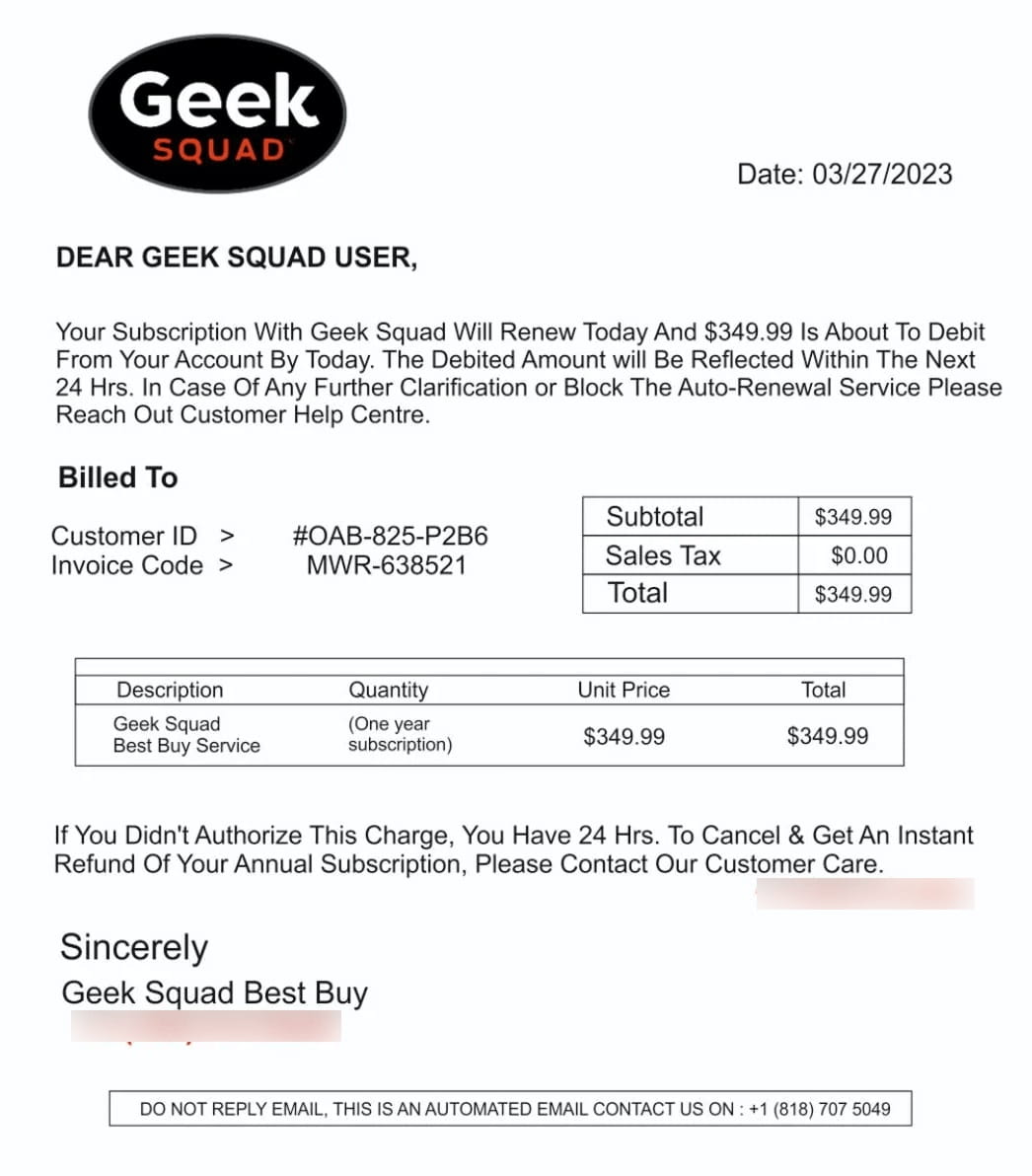
A Geek Squad scam email usually tries to force one of three moves:
- Call a phone number to “cancel” (the most common pattern).
- Click a link to a fake dispute portal (credential theft).
- Open an attachment that contains a link, a tracker, or a malicious script.
And there are also different Geek Squad email scam variants that don’t even mention money. They claim suspicious logins, “verification required,” or “account will be locked.” We’ll explain them a bit later.
How the Geek Squad Scam Works
The execution of a Geek Squad scam typically starts with an email.
Phase 1: Distribution and evasion
It begins when a Geek Squad scam email lands in your inbox. Subject lines, as usual, are created to spike attention:
- “Your plan renewed successfully”
- “Invoice attached”
- “Payment successful”
- “Auto-renewal: action required”
The email often includes:
- a charge amount (usually a few hundred dollars)
- a fake invoice ID / customer ID
- an attachment (PDF, sometimes HTML) that looks official at a glance
- a phone number to “cancel”
Typically, there is no "unsubscribe" button, only a bold phone number. They want you to call because once you’re on the phone, filters and warnings stop helping. The attack shifts to vishing (voice phishing).
Phase 2: Social engineering and vishing
If you panic and call, you won’t hear a robot. You’ll hear a calm, professional-sounding “agent.” The opener uses a script to create authority and momentum.
They will apologize profusely for the "system error." To process your refund, they claim they need to connect to your secure server. They will insist you install legitimate remote desktop tools (like AnyDesk, TeamViewer, etc.) to “process the refund.”
Remote access turns your laptop into their laptop. They can open your browser, read saved passwords, pull files, redirect banking sessions, even set up persistence.
Phase 3: Technical exploitation
Once remote access is established, the scammer has your screen, your mouse, your keyboard.
What they can do in minutes:
- open your browser and scrape saved passwords
- dig through Downloads/Desktop for “tax”, “invoice”, “passport”, “backup”
- hijack an active email session and reset accounts tied to that inbox
- install additional tools (sometimes quietly)
Black screen and persistence
A common move is blanking your display using features like “privacy mode” / screen hiding.
Persistence: In tools like AnyDesk, scammers may enable "Unattended Access" and set a password. This creates a permanent backdoor, allowing them to reconnect days or weeks later without user interaction to deploy ransomware or steal data.
Persistence is the scarier part. In tools like AnyDesk, scammers may enable Unattended Access and set a password. That creates a backdoor so they can reconnect days or weeks later without you clicking anything.
Phase 4: Financial fraud and HTML injection
The climax is usually “refund fraud.” It’s a technical illusion designed to squeeze money out of you.
The “Inspect Element” banking trick
They ask you to log into your bank to “verify the refund.”
Then they use your browser’s Developer Tools (often F12) to locally edit the page HTML. Example: they change a balance like $2,000.00 to $20,000.00 on your screen only. The bank didn’t send anything and the server didn’t change. It’s cosmetic – like putting a fake sticker on your dashboard.
Then comes the pressure. The scammer starts screaming, crying, begging you to wire back the difference before they "lose their job":
- “Oh no, we sent too much.”
- “I’ll be arrested / fired.”
- “Please return the difference right now.”
This emotional squeeze is the core of the Geek Squad scam. Fear + guilt + a ticking clock.
Money laundering routes they push
They’ll steer victims into irreversible payment rails:
- Gift cards (“corporate reimbursement”)
- Wire transfers (to a “manager,” often a money mule)
- Cryptocurrency (Bitcoin ATMs or exchanges)
Common Geek Squad Scam Email Types
- The “auto-renewal invoice” classic: This is the most common Geek Squad scam email template. It claims you were charged for an annual plan renewal. The call-to-action is “Call to cancel.”
- The “refund available” bait: In this version, the email states they already owe you a refund for a service discontinuing. They claim they can't send the money back to your card and need your direct bank details or crypto wallet address.
- The “PDF invoice”: The email claims to be an invoice or other important document, but the "invoice" is actually a malicious attachment (often a Word doc with macros or a disguised .EXE file).
- The “account security” impersonation: These claim suspicious sign-in detected/password reset requested/account will be locked/etc. Security emails feel normal, so that’s exactly why attackers imitate them.
- The "Best Buy" hybrid: Sometimes the Geek Squad scam impersonates the parent company, Best Buy. These emails might claim you bought a 75-inch TV or a MacBook. Since the item is physical and expensive, victims are even faster to pick up the phone.
- Fake antivirus alerts: This variant warns of a "severe network infection" or compromised system. It uses fear to prompt the installation of "diagnostic" tools, which are actually Remote Access Trojans (RATs).
Red Flags: How To Spot It In 10 Seconds
These attacks rely on volume, not perfection, so they almost always leave sloppy fingerprints. If you see these signs, delete and report the email immediately.
- A random big charge (“$399”, “$499”) with a fake renewal story → classic Geek Squad scam email bait.
- A phone number as the main CTA (“Call to cancel immediately”) → almost always a Geek Squad email scam.
- Sender mismatch: display name says “Geek Squad,” but the actual address is unrelated – public domains (@gmail.com, @yahoo.com) or typosquats (@geek-squad-support.com).
- Pressure language: “24 hours,” “final notice,” “account will be charged.” That panic is the product.
- Attachment-first: “Invoice.pdf” or worse, “Invoice.html.” Many Geek Squad scam campaigns hide the trap there.
- Generic greetings: Legitimate companies use your name. If the email starts with "Dear Customer," "Dear Subscriber," or just "Hello," it is a blast message sent to thousands of people.
- The "Gmail" invoice: Many Geek Squad scam attempts abuse free invoice generators (like PayPal or QuickBooks) to send the message. If the email comes via a service you don't use to pay Best Buy, it's fake.
One more: if you never purchased anything and the email acts like you did, treat it as a Geek Squad scam email by default.
Deep Inspection: What To Check Before You Click Anything
So the email looks halfway decent, and you aren't sure. Before you panic-dial that phone number, try these non-invasive checks.
- Check the link without visiting it: Hover the button/link. If it points to a weird domain, a URL shortener, or a random file host, that’s a Geek Squad email scam pattern. Watch for “almost-right” domains (bestbuysupport-something, geeksqoad, extra hyphens).
- Check the attachment type: PDF invoices in a Geek Squad scam email often contain a single goal: make you call a number. HTML attachments are worse. They can open a fake portal locally in your browser. If you see “.html” from “billing,” be sure it’s a Geek Squad scam.
- Google the phone number: Copy the support number from the Geek Squad scam email and paste it into a search engine. If it is a scam, you will likely find Reddit threads or "WhoCalledMe" reports from other victims. If it doesn't lead to the official Best Buy "Contact Us" page, it’s a trap.
- The "Reply-To" lifehack: Hit "Reply" (but do not send). Check the email address that automatically shows in the "To" field. Scammers often spoof the visible sender name to say "Geek Squad," but the actual routing address will be a personal Gmail or Yahoo account.
- Check your bank first: Don't trust the email. Open a separate browser tab, log into your credit card or bank account directly. Do you actually see a charge for $399? If not, the invoice is a fiction.
If You Already Opened It (Damage Control Checklist)
First, calm down. It may happen to everyone. What matters is what you do next.
If you only opened the email
Simply opening the email usually isn't enough to infect your computer, but you might have triggered a "tracking pixel."
- Do not reply: Even a sarcastic response confirms to the Geek Squad email scam bot that your address is active.
- Block and report: Mark the message as "Phishing" in your email client. This helps global filters learn to stop the next Geek Squad scam wave.
- Delete: Remove it from your Trash folder to prevent accidental clicks later.
If you clicked a link or downloaded an attachment
- Disconnect immediately: Turn off Wi-Fi or unplug your Ethernet cable. This stops potential malware from "phoning home" to the scammer's server.
- Scan for malware: Run a deep system scan using reputable antivirus software. Look specifically for "Trojans" or "Keyloggers."
- Change your email password from a clean device (not the one you clicked on). A Geek Squad email scam often aims at your inbox first. If you logged into any account while the malware was potentially running, you must treat those passwords as stolen. Change them all.
- Turn on 2FA. Then check your inbox settings for forwarding rules you didn’t set.
If you called the number
If you spoke to them but didn't install anything or give payment info, you are mostly safe, but you are now on a "sucker list."
- Assume anything you said can be reused (name, email, address). That’s fuel for the next Geek Squad scam.
- Block the number: They will call you back, often pretending to be a "manager" or even the "police" investigating the scam.
- Watch for follow-up calls/emails. Scammers love “warm leads.”
If you installed AnyDesk/TeamViewer/remote tools
- The "hard shutdown": Do not try to close the windows. Hold your computer’s power button down for 10 seconds until the screen goes black.
- Disconnect from the internet. Unplug your router if you have to.
- Boot in Safe Mode: Restart your computer in Safe Mode (without networking).
- Uninstall the remote software immediately.
- Check for backdoors: Scammers often install a second, hidden program in case you delete the first one. A professional malware cleanup might be necessary.
- Check whether “Unattended Access” / “Start with Windows” was enabled.
- Run full scans and do a deep cleanse.
- Change passwords (email, banking, work accounts) and revoke active sessions.
If you paid
- Credit/Debit Card: Call your bank/card issuer immediately and dispute.
- Gift Cards: If you read them the numbers off a gift card, call the issuer (Apple, Google, Amazon) instantly. They can sometimes freeze the funds if the scammer hasn't spent them yet.
- Crypto: Unfortunately, crypto transfers are usually irreversible. However, you should still report it to the FBI’s IC3 or your local cybercrime unit.
How To Stop Geek Squad Scam Emails
You can’t stop criminals from trying, but you can build a taller wall.
- Block the domain: Don't just block the sender (they change emails daily). In your email settings, create a rule to block the entire domain if it looks suspicious (e.g., @gmail-invoices-alert.com).
- Report as phishing: Never just hit "Delete," use the "Report Phishing" button if possible. This sends the email's digital fingerprint to your provider, helping to block that Geek Squad email scam for millions of other users.
- Create a filter: Set up a custom filter to automatically trash emails containing the specific phrase "Geek Squad" unless the sender contains "bestbuy.com."
- Forward to Best Buy: Forward the Geek Squad scam email to abuse@bestbuy.com. Their legal team tracks these campaigns to shut down the call centers.
- Report to the FTC: Forward the email to reportphishing@apwg.org or file a quick complaint at ReportFraud.ftc.gov. It creates a paper trail for law enforcement.
- Don’t feed the list: Don’t reply, don’t “confirm cancellation,” don’t forward it around to ask opinions. The Geek Squad scam relies on people opening and clicking on links.
How To Protect Yourself Long-Term
From phishing to ransomware, your inbox is the main target of cyberattacks. Fortunately, you can protect it with a few simple steps.
- "Zero trust" approach. Use a simple rule: email is for notification, not verification. Never trust a phone number or link inside a message. Open a fresh browser window and type the website manually.
- Split your inbox roles with aliases. Keep finance, work, and sign-ups separate so one compromised address doesn’t domino into everything.
- Upgrade your email login security. Use a password manager + non-reused passwords + 2FA/passkeys, because email takeover turns every “reset password” link into an attacker tool.
- Audit mailbox rules and sessions monthly. Check forwarding, filters, “send mail as,” and logged-in devices.
- Enable real-time bank alerts. Set your banking app to push a notification for every transaction. You will know instantly if a card is compromised.
- Keep your OS updated. Updates contain security patches for possible vulnerabilities. Update early and often.
- Choose a secure email provider. Traditional email services are the prime targets for these attacks. Worse, they put you at risk from the inside out by harvesting your personal data, scanning your inbox, and plastering your screen with ads.
- Pick a secure, private email provider that minimizes data collection, offers strong encryption, and gives you tools like free aliases and anti-spam controls. The payoff is simple: less exposed content, fewer usable hooks, better containment when attacks try to happen.
FAQ: Geek Squad Scam
What is the Geek Squad scam?
A Geek Squad scam is a fraud attempt that impersonates Best Buy’s Geek Squad, usually via a fake renewal/invoice message, to push you into calling a number, clicking a link, or installing remote-access software.
Is Geek Squad emailing me real?
Usually not. If a “renewal” email pushes a phone number to cancel, treat it as a Geek Squad scam email.
What if I actually have a Geek Squad plan?
Verify by logging into your Best Buy account through the official website/app (typed manually), not via any link in a Geek Squad scam message.
Can opening the Geek Squad scam email infect my device?
Opening a Geek Squad scam email usually isn’t enough. Clicking links, opening strange attachments (especially HTML), or installing remote tools is where damage starts.
Should I call the number to confirm?
No. A Geek Squad email scam becomes vishing the second you dial.
I called the number but didn't pay anything; am I safe?
Financially, yes, but your phone number is likely now on a "target list." Expect a significant increase in spam calls and other Geek Squad scam attempts in the coming weeks.
Why do they pick Geek Squad specifically?
Because it’s recognizable. A familiar brand lowers skepticism and makes a scam feel like routine billing or support. Big names get impersonated constantly, like: PayPal scam email, Norton LifeLock scam email, McAfee scam email, delivery brands, banks, streaming services.