

Tl;DR
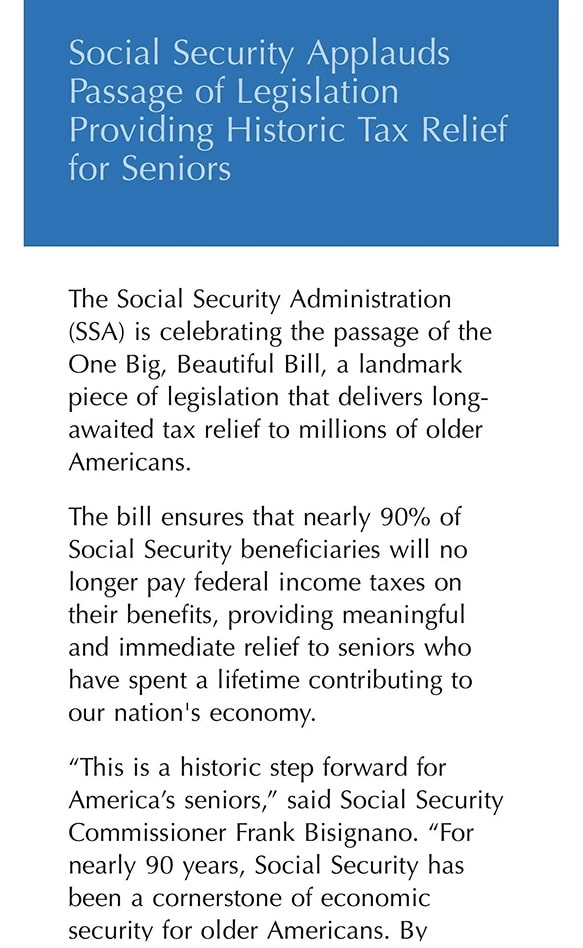
- In July 2025, the Social Security Administration (SSA) sent a mass email to over 70 million "My Social Security" users, hyping President Trump's freshly signed "One Big Beautiful Bill Act" as providing "unprecedented" tax-free benefits for nearly 90% of recipients.
- This was a pure clickbait that sparked scam panic, political fury, and a massive privacy concern.
- Reality: It was just a temporary $6,000 extra deduction for seniors 65+, phasing out at higher incomes and expiring in 2028, not a full tax wipeout, leaving millions confused and trust funds on a faster drain.
What Happened
The trigger event: On July 4, 2025 (Independence Day), President Trump signed the "One Big Beautiful Bill Act," a sweeping tax package. Days earlier, SSA blasted the email to users, framing it as a celebratory win with bombastic language mirroring Trump's style: "big, beautiful bill" promising most seniors would "no longer pay a dime in federal income taxes on their hard-earned benefits".
The fallout: Spam filters at major providers (Gmail, Outlook, Yahoo) begin flagging the email as "Promotional" or "Junk" due to the aggressive capitalization and non-standard government language. Bold claims of 90% tax relief via "historic elimination," along with patriotic graphics and urgent calls to check accounts, cause an instant delete-or-forward reaction.
Helplines crashed with scam reports, too: from retirees fearing SSN hacks to planners rethinking taxes.
What was inside the email
Instead of citing "H.R. 1" or "The Fiscal Reconciliation Act," the body of the email used the specific branding "One Big Beautiful Bill" six times.
It explicitly stated that "90% of seniors will pay ZERO tax on their benefits," citing a "new historic exclusion." While this is technically an interpretation of the law's effect, it wasn't a description of the law's mechanism. The email did not mention the relevant caps, the 2028 expiration date, or the fact that this was a deduction, not an exemption.
Why Millions Thought The SSA Email Was A Scam
Here is the irony of the Social Security email big beautiful bill debacle: The official government communication looked less authentic than the scams that followed it.
- Hype language instead of admin language. Government notices usually read like beige paperwork. Using emotive adjectives like “Beautiful” and “Historic” in an alert is a classic hallmark of social engineering.
- Too big, too fast, too broad. Mass sends during headline cycles are exactly when spoofed follow-ups appear.
- Sender verification isn’t obvious in most inboxes. On mobile you see a display name, not SPF/DKIM/DMARC results.
- High-value targets behind the click. “My Social Security” accounts can expose identity data. That’s why people reacted with spam-folder moves, virus scans, and “do not click” paranoia
Smart instinct, honestly. The safest move in any such case: don’t use the email link – type the official website address yourself.
Reality Check: What the Email Claimed vs. Reality
The SSA email painted a dream of total tax freedom, but the "One Big Beautiful Bill Act" was a far more modest change.
What the email implied
The Social Security email big beautiful bill messaging pushed a simple takeaway: retirees won, taxes are gone for 90% of seniors, historic change. That’s why people repeated the “no more federal tax on Social Security” line like it was a new rule.
What the law actually did
The reality behind the law is more boring and more specific:
- It created a temporary additional deduction for people age 65+.
- The deduction is $6,000 per eligible person (so $12,000 if both spouses qualify).
- It applies for tax years 2025 through 2028.
- It phases out once modified adjusted gross income goes above $75,000 (single) or $150,000 (married filing jointly).
That’s not a Social Security tax rewrite. That’s an income-tax deduction that can reduce your taxable income, which can indirectly reduce how much of your Social Security becomes taxable for some filers.
Expert Reaction: Why Policy People Called It Misleading & Risky
Tax & policy blasts: ITEP, Tax Policy Center, and ex-SSA commissioners criticised it as "propaganda masquerading as service". They overstated a routine deduction as "taxes gone forever," breaching agency's apolitical mandate and confusing vulnerable seniors on real liabilities.
Risk amplifiers: Behavioral economics experts noted scam-normalization effect (government acting suspiciously boosts real fraud); legal experts flagged Hatch Act violations – eroding public trust while inviting cyberattacks on SSA portals.
In such cases, real phishing skyrockets too on the confusion wave. Here's your brief checklist to never fall victim:
- Spot red flags. Hype-y language, vague miracles, urgency, threats, or “exclusive eligibility” are classic social-engineering signals.
- Don’t trust links. Don’t click. Open a new tab and type the official site yourself (or use a saved bookmark).
- Check the "Reply-To" field: Scammers can spoof the sender name (e.g., "SSA Support"), but the reply-to address usually reveals the truth (e.g., support@ssa-benefits-claim.net).
- Enable 2FA everywhere (especially email). Your email is the master key for password resets. Use authenticator-based 2FA where possible; SMS is better than nothing but easier to intercept.
- Never share data via email if asked by a “service”. No SSNs, ID photos, bank details, passwords, one-time codes – ever. Legit orgs don’t need them via email.
- Treat attachments as malware until proven otherwise. “Invoice,” “document,” “security report,” “tax form,” “missed delivery” – classic malware wrappers. If you weren’t expecting it, don’t open it.
- Watch for the “follow-up trap.” The first email can be harmless; the second one asks you to log in, pay, or verify. That’s often the real strike.
- Compartmentalize with dedicated addresses. Use separate identities for banking/government/work accounts. If one leaks, the rest don’t burn. You can use email aliases for this case.
And the most important move: choose a private email service.
Atomic Mail is built for people who don’t want their inbox treated like an ad-tech product:
- Minimal data collection – we don’t need your personal details to run email
- Advanced end-to-end and zero-access encryption, so your messages aren’t readable for anyone
- No-phone sign-up – better anonymity, fewer recovery weak points, less SIM-swap exposure
- Seed phrase recovery – secure and private recovery
- Multiple aliases for inbox separation and better organization
✅🔐 Sign up for Atomic Mail for free today and protect your inbox.
FAQ: Social Security Email Big Beautiful Bill
What is Social Security email big beautiful bill?
It refers to a controversial mass email sent by the Social Security Administration on July 3, 2025, promoting the "One Big Beautiful Bill Act." The email promised "historic tax relief" using unusually colorful and politicized language, which confused millions of recipients and triggered spam filters worldwide.
Was the email a scam?
Technically, the email from the SSA was authentic, but its claims were highly misleading. While it wasn't a phishing attempt itself, its confusing design created a "trust vacuum" that scammers immediately exploited with look-alike emails that were malicious.
Why was the email criticized by experts?
Policy and tax experts argued it overstated what the law actually does, framing a temporary deduction like a permanent “taxes gone” promise. Critics also warned that overtly political-style messaging from an agency erodes trust and can make fraud easier.
How do I spot real phishing emails?
Don’t judge by the logo or sender name – those are easy to fake. Look for urgency, vague promises, requests for sensitive data, odd domains/reply-to addresses, unexpected attachments, and links that pressure you to log in or pay.
Why choose a private email provider?
Traditional email services are often built on an ad/analytics model: the more they can learn about your behavior, the more valuable you are, making your inbox a prime target for scams and phishing.
A privacy-first provider like Atomic Mail helps shrink your attack surface: minimal personal data collection, end-to-end encryption for real confidentiality, no-phone sign-up, secure seed phrase recovery, and multiple aliases so one leaked address doesn’t poison your whole identity.