

TL;DR
- Vishing is voice phishing: scammers use phone calls (or voicemail) to trick you into handing over money, login details, one-time codes, or identity data.
- A typical vishing attack feels urgent: “fraud alert,” “account locked,” “police case,” “your package,” “your employee payroll,” “your CEO needs this now.”
- The most dangerous moment is when a caller asks for a verification code (OTP), remote access, or a payment you can’t reverse.
- Defense is boring but effective: hang up, call back via an official number, never share codes, lock down accounts so a phone scam can’t pivot into email takeover, and use privacy-first services.
What Is Vishing?
Vishing definition
Vishing (voice + phishing) is a social engineering scam where an attacker uses voice communication (live calls, robocalls, voicemail, even “press 1 to connect”) to steal something valuable: credentials, payment access, personal data, or control of your accounts.
Vishing vs Phishing vs Smishing vs Quishing
These are attacks through different channels. Same aim (stealing your data or money), but a different delivery method.
Here’s a quick comparison:
And in the real world, attackers can combine them. A vishing call to get you emotional, then a phishing email to “confirm,” or a smishing text with a link to a page with a QR code (quishing) that hides the real destination.
How Vishing Works
The vishing flow
Most vishing attacks follow the same flow.
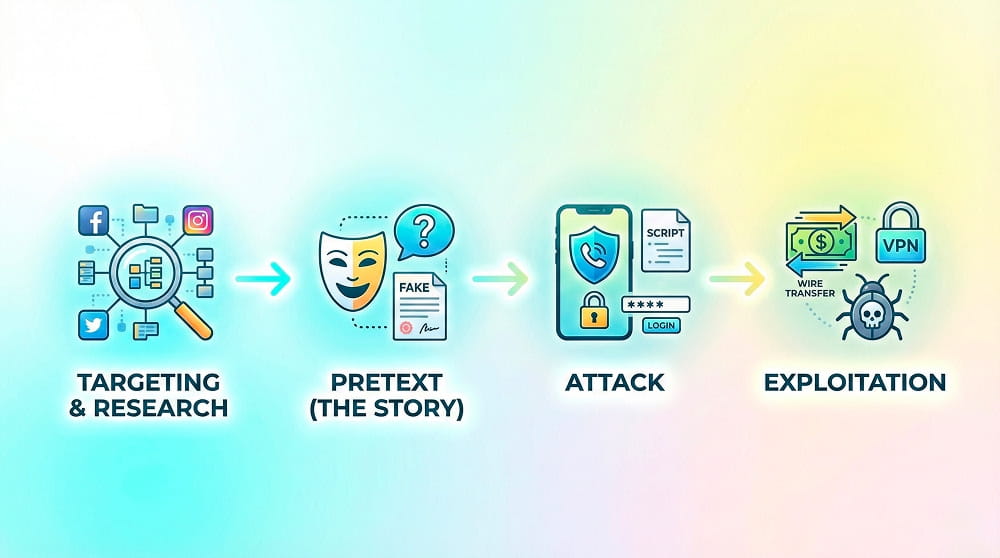
- Targeting & research: They mine public info (LinkedIn roles, company vendors, press releases, email signature, etc) or buy breached data on the dark web (names, partial card numbers, addresses). It makes the call sound legit.
- Pretext (the story): A pretext is a fabricated scenario used to engage the victim. Successful ones are based on authority or helpfulness. Common pretexts include IT support (MFA resets), authority threats (IRS/Police), or benign lures like subscription renewals.
- Attack: Caller ID spoofing makes their number look real to ensure the call is answered. Once connected, they use a script to manipulate you into triggering a real login attempt on your account while they wait for the code.
- Exploitation: The objective depends on the target: authorizing wire transfers, gaining VPN access, or installing remote access tools that deploy malware directly onto your device.
A vishing attack is a funnel: attention → trust → urgency → action → loss.
The psychology levers
Why do smart people fall for vishing? Because our brains are instinctively wired to trust the human voice. Moreover, some vishing scripts are masterclasses in applied psychology, including Robert Cialdini’s principles of persuasion to bypass rational thought.
Tech infrastructure
- VoIP & spoofing: VoIP enables low-cost, high-volume calling and easy manipulation of caller ID metadata.
- Caller ID spoofing: To masquerade as trusted entities such as banks or IT departments, attackers overwrite the 'Calling Party Number'.
- Robocalls + IVR menus: Automated calls (“press 1”) filter victims fast and route the most reactive people to a live scammer.
- Wardialers: Automated tools cycle through numbers to identify active lines for future targeting.
- Voice changers: Advanced actors use real-time AI tools to alter pitch and accent, enhancing credibility.
- Remote access tools: “Support” apps (like AnyDesk/TeamViewer-style) let them view your screen, grab data, and install more junk.
- Soundboards: Software that plays background noise (office chatter, typing, sirens) to sell the illusion of a busy call center or emergency.
Types of Vishing Attacks
Here are the most common vishing attack patterns you may face:
- Bank and payment “fraud department” – They claim suspicious activity and push you to “verify” details, share OTPs, or approve a transaction you didn’t initiate.
- Tech support / IT helpdesk – “Your device is infected” or “your mailbox is compromised,” followed by pressure to install a remote access tool or reset MFA.
- Government or law enforcement intimidation – Tax office, police, court, immigration: the goal is panic plus instant payment (often via wire, crypto, or gift cards).
- Telecom and SIM-swap setup – They imitate your carrier to collect identity data or trick you into approving changes that let them hijack your number and intercept codes.
- Delivery, subscription, and account verification – “Package stuck,” “payment failed,” “renew now,” usually paired with a follow-up link (smishing) or a request for card details.
- Payroll / HR / CEO fraud (business vishing) – Impersonates executives or vendors to rush invoices, change bank details, or request employee tax/payroll data.
- Charity and ‘support a cause’ scams – Emotional story + urgency + payment request, often around disasters or trending events.
- AI voice cloning (deepfakes) – Uses a cloned voice of a boss, relative, or coworker to make the request feel unmistakably real; often paired with urgency and secrecy to prevent verification.
How to Spot Vishing in the Moment
Detecting a vishing attack requires listening for context, not just content.
- They demand a code – Any caller asking for an OTP, push-approval, or “verification number” is a vishing attack until proven otherwise.
- They punish verification – “Don’t hang up,” “don’t call back,” “our lines are monitored.” That’s control, not security.
- They rush you – Urgency is the fuel of vishing: short deadlines, warnings, “right now.”
- They ask for secrecy – “Don’t tell your manager/spouse.” Legit teams don’t isolate you.
- They steer you to weird payments – Gift cards, crypto, “safe accounts,” instant wires. Red flag, full stop.
- They ask for remote access – If the fix requires screen sharing, it’s almost 100% a trap.
A useful one-liner you can memorize: “I don’t share codes. I’ll call back using the official number.” Then hang up.
How to Prevent Vishing
Below are some steps to take to reduce your attack surface, leaving fewer opportunities for a vishing attack.
- Always use the callback rule – End the call, then call the official number from the back of your card / the bank app / the company directory.
- Treat OTPs like passwords – Never read them out loud, never type them into a link sent by the caller, never “confirm” them.
- Lock down your phone number – Add a carrier port-out PIN, secure voicemail, and consider SIM swap protections where available.
- Harden your logins – Use unique passwords + an authenticator app or security key; avoid SMS-only MFA for accounts.
- Separate your identities – Different emails (or aliases) for banking, work, and random signups reduces blast radius when a vishing attack pivots to account recovery.
- Reduce your public footprint – Filter what you post on social media and LinkedIn (phone numbers, exact tools/vendors, internal team structure, etc.)
- Practice data minimization – Don’t give your phone number to services that don’t truly need it.
- Use private services – The less personal data a service stores, the less there is to leak, scrape, or weaponize later. This matters a lot for email: it’s the core channel for communication, password resets, and account recovery, which makes it a prime target for cybercriminals. Traditional "free" providers are the worst of both worlds: they are big honey pots for external attacks, and they internally scan, store, and monetize your personal data.
What to Do If You Fell Under a Vishing Attack
Don't panic, it could happen to anyone. If you realise you've been fooled, act quickly.
If you shared info (financial, accounts)
- Call the institution immediately: Call your bank or credit card issuer and tell the fraud department: "I just disclosed my account details to a scammer."
- Freeze your credit: Go to the apps or websites of the three major credit bureaus and place a temporary freeze on your credit report. This stops the scammer from opening new loans or cards in your name.
- Change reused passwords anywhere you used similar details (email, banking, marketplaces).
- Enable multi-factor authentication (MFA) immediately if the compromised account didn't have it turned on.
If you shared a code
- Assume account takeover is in progress. Log in from a trusted device and change the password immediately.
- Revoke sessions/tokens (log out of all devices) and review security settings, recovery email/phone, and any “trusted devices.”
- Reset the password for that account immediately. If you reused that password elsewhere (which you shouldn't!), change those too.
- Rebuild MFA: rotate authenticator/keys where possible; stop using SMS-only MFA for that account.
If you installed software
- Disconnect from the internet (Wi‑Fi/cellular) to stop remote control.
- Remove the tool and run a reputable anti-malware scan; if it’s a work device, involve IT.
- Change passwords from a different, clean device, not the one the vishing attack touched.
- Treat the device as contaminated: don’t log into banking or email from it until it’s clean.
- Check for persistence: device admin permissions, accessibility access, unknown profiles/MDM, startup apps.
FAQ: Vishing Attacks
What is vishing in cyber security?
Vishing (Voice Phishing) is a form of social engineering where attackers use phone calls to impersonate trusted entities to trick victims into revealing sensitive data or transferring funds.
What is the difference between vishing and phishing?
The main difference is the medium: Phishing relies on deceptive emails and malicious links, while a vishing attack uses the human voice and the telephone to manipulate victims in real-time.
Is vishing more dangerous than phishing?
In many ways, yes. It exploits the "mobile security gap" and the biological pressure of a live conversation.
What is the difference between vishing and smishing?
Vishing occurs over voice calls, while Smishing (SMS Phishing) attacks occur via text messages.
Can a vishing attack spoof a real number?
Yes. Caller ID is not proof of identity; spoofing is cheap and common.
Is it ever safe to read a verification code to support staff?
No. Treat OTPs like passwords. Legit teams can verify you without asking you to read a code.
What if I answered but didn’t say anything?
Usually low risk, but stay alert: scammers sometimes call back with a stronger pretext once they know the number is active.
How can I distinguish a deepfake voice from a real one?
It is getting harder and harder. Current indicators to be aware of include unnatural pauses, a lack of emotional variance (i.e. a flat tone) and digital 'clipping' sounds. However, high-end clones are nearly perfect. The only reliable method is process, not perception: verify the caller's identity through a secondary channel.
Why do attackers want me to say "Yes"?
Historically, it was believed that scammers recorded 'yes' to authorise charges (cramming). While this practice has faded, the primary goal is now often to confirm that a real person is on the line (for selling lists) or to manipulate the victim into a 'compliance mindset' for the rest of the script.
Can vishing compromise my phone just by answering?
Generally, no. Answering a call does not hack your phone. The compromise occurs when you do something: press a button, visit a website, or share information. However, answering confirms your number is active, likely leading to more calls.