

TL;DR
- 2026 kicked off with another Google Gmail data breach headline. Roughly 48 million Gmail logins appeared inside a massive ~96-GB exposed database that bundled credentials from many other big services as well.
- What leaked was the classic package: user logins and passwords. That’s enough for automated takeovers, inbox rule tampering, and “reset-everything-from-email” cascades. This is why a Google Gmail data breach warning keeps resurfacing: Gmail is the internet’s default identity hub, so attackers aim at it nonstop for years.
- How to check if you’re affected: run your email address through an independent tracker like Have I Been Pwned, and immediately audit the active devices currently connected to your Google security dashboard.
- How to protect: use a unique password, turn on phishing-resistant 2FA (passkeys/security key), sign out other sessions, and clean the device if you suspect malware.
- The best defense, though, is stepping away from the surveillance model entirely: choose a secure Gmail alternative like Atomic Mail (private by default, built for compartmentalization with aliases, and designed to minimize what anyone, including the provider, can see.
Early 2026 Gmail Credential Exposures
A Google Gmail data breach can happen in one of two ways:
- Way A: Google infrastructure gets compromised (more rare).
- Way B: your Gmail credentials are stolen by malware/phishing, then end up in an open database (common, repeatable).
The January 2026 Google Gmail data breach story was Way B. Gmail was just one part of a much larger credential exposure affecting other major services.
Jan 2026: exposed database with 149M stolen logins
In late January 2026, security researcher Jeremiah Fowler reported finding a publicly accessible, unsecured database on the internet. There was no password, no access controls, it was just open.
A 96-gigabyte database containing 149,404,754 sets of login credentials, including 48 million Gmail accounts, was found completely without encryption.
What was inside
The dataset was highly structured and organised meticulously by victim and source.
- email/username
- plaintext passwords
- sometimes the login URL for the service
- sometimes extra “breadcrumbs” that make targeting easier (service names, patterns, and other clues reported by multiple write‑ups)
Exposed accounts
Email providers and identity hubs
Other big platforms
A massive list.
Turning back to Google: Google publicly denied any internal Gmail breach in connection with this exposure, and reports described the data as harvested by infostealer malware and similar credential theft pipelines.
Why this still counts as a Google Gmail data breach story, even if Google wasn’t “hacked”:
- Attackers don’t need to break into Google when they can log in as you.
- Once Gmail is taken, it becomes the reset button for everything else.
How leaks like this happen repeatedly
Gmail is a prize because Gmail is a hub.
Why Gmail is an attacker’s magnet
Gmail isn’t just email. Gmail is:
- your password reset center
- your Google account gateway (Drive, Photos, Docs, Workspace)
- the identity behind app stores, ad accounts, developer tools, analytics, and billing
So the Google Gmail data breach cycle keeps repeating:
- attacker steals a password (phishing, malware, reused creds)
- attacker tests it on Gmail
- attacker uses Gmail to open everything else
- stolen data gets resold, re‑dumped, exposed again
And here's one more troubling fact: people reuse passwords even when they swear they don’t.
Concurrent technical vulnerabilities
Credential theft spikes when the broader ecosystem is weak.
Although credential exposures were caused by endpoint malware, the Google ecosystem also had severe structural vulnerabilities.
Example: browser exploitation and malware delivery.
On February 13, 2026, Google released emergency patches for CVE-2026-2441, a critical 'use-after-free' zero-day vulnerability located within the CSS component of the Chrome browser.
In plain terms: a booby‑trapped web page can trigger remote code execution in the browser, which can lead to theft of session data and authentication cookies. This is the kind of content that infostealers love, as it helps attackers exploit an already-authenticated session.
Other common “concurrent” weaknesses that turn Gmail theft into a routine business:
- malicious browser extensions that can read pages or inject scripts
- session cookies stolen from browsers (password change helps, but you also need to kill sessions)
- SMS-based MFA that gets bypassed via SIM swap or real‑time phishing
- third‑party OAuth apps approved once, forgotten forever
If a Google Gmail data breach warning feels relentless, it’s because the pipeline is relentless.
Historical Context: A Retrospective On Google Gmail Data Breaches
A quick timeline of the patterns (not all of these were a direct Google infrastructure compromise):
- 2014: Nearly 5 million Gmail addresses and plaintext passwords were dumped on a Russian Bitcoin security forum. Google stated their servers weren't breached. Attackers harvested these credentials through years of phishing and compromised third-party sites.
- 2019: “Collection #1” and later “Collections #2–#5” packaged billions of email/password pairs from older breaches into easy-to-use credential stuffing lists. Gmail addresses were everywhere because Gmail addresses are everywhere.
- 2021: a massive database called COMB (Compilation of Many Breaches) leaked online containing ~3.2B email/password combinations. It was a searchable goldmine for hackers. Gmail addresses heavily populated this list.
- 2024: The Mother of All Breaches (MOAB): Cybercriminals dropped a 26-billion-record database. This supermassive black hole of data aggregated thousands of older leaks. It heavily featured Gmail addresses tied to compromised accounts from LinkedIn, Twitter, and Adobe.
- 2025: Researchers reported ~16B exposed login records across ~30 datasets, largely tied to infostealers and older breach material; Google/Gmail credentials appeared as a big part of the mix.
- 2025: Just months later, another 183 million unique email addresses surfaced on illicit forums. A massive percentage of these were active Gmail accounts compromised by RedLine and Vidar malware.
- 2026: the January exposure (149M total, ~48M Gmail) was the same script.
A Google Gmail data breach often means your Gmail addess/password got stolen somewhere else, then reappeared in a dump.
Deprecation Of The Dark Web Report
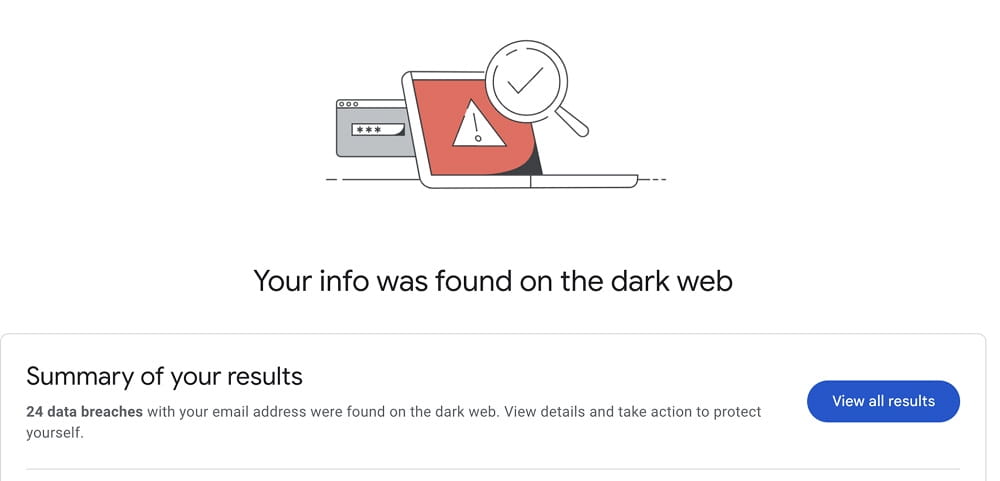
Google had a native tool for dark web monitoring called the 'Dark Web Report'. However, on 16 February 2026, Google removed this feature completely.
Google decided that monitoring leaked data passively caused alert fatigue without providing users with actual steps to fix the problem. Therefore, the company is now investing more in active cryptographic defence mechanisms, particularly the widespread adoption of Passkeys. Following the shutdown, users are advised to switch to comprehensive credit monitoring services (like Norton or Experian), which link data exposure to active financial fraud indicators.
Am I Affected? Ways To Check & Tools For Identity Monitoring
A Google Gmail data breach isn’t always obvious. Do not sit around waiting for a ransom demand, check periodically.
Quick checks inside Google / Gmail:
- Google Account → Security → Recent security activity. Unknown sign-in? Unknown device? Treat it as a Google Gmail data breach warning.
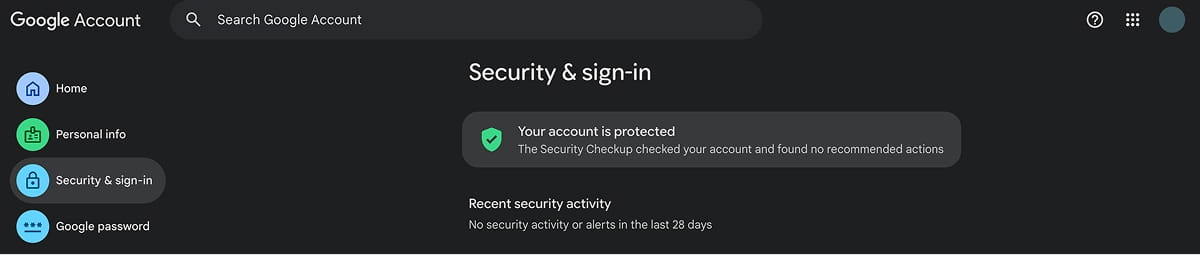
- Google Account → Security → Your devices list. Anything you don’t recognize gets signed out.
- Google Account → Third-party apps & services. Delete connections with apps you don’t fully trust.
- Gmail → Settings → Forwarding and POP/IMAP. No forwarding address should exist “by accident.”
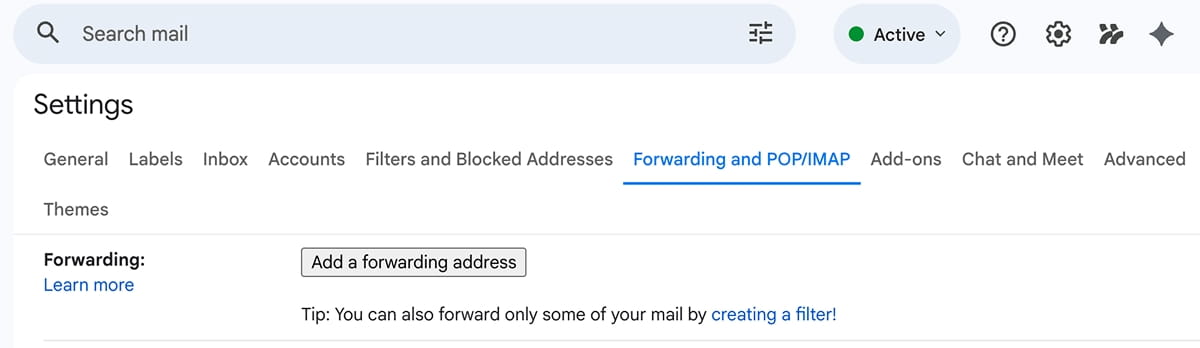
- Gmail → Settings → Filters and blocked addresses. Attackers love rules that hide password reset emails.
- Google Password Manager / Chrome compromised password alerts. If Chrome warns “a data breach exposed your password,” it’s flagging a known breached email+password combo.
External identity monitoring tools (email-focused):
- Have I Been Pwned – check whether your email address appears in known breaches. Start here when you see a Google Gmail data breach warning trending.
- Review third-party apps: Check your OAuth permissions. Hackers frequently bypass passwords by hijacking an obscure, forgotten calendar app you granted inbox access to years ago.
How To Protect Yourself
A complex password is a joke to modern cyber cartels.
Here’s the full stack, from most urgent to most overlooked.
#0. Switch to a secure email first
A Google Gmail data breach is scary, but it’s also not the only threat.
Google makes money primarily from advertising and tracking-based personalization, not from selling a private inbox subscription. That business model rewards data collection, profiling and fingerprinting at scale. Even if you never see a Google Gmail data breach warning again, the incentives don’t change – the system is designed to watch you.
When you choose a secure, end-to-end encrypted email service like Atomic Mail, you eliminate both threats simultaneously.
But maybe you are locked into the Google ecosystem for work. If you still want to use Gmail (or any other email safely), you have to aggressively harden your defenses. Use this guide to survive the next inevitable Google Gmail data breach warning.
1. Lock the login
- Use a unique password or a passphrase for every account. Unique means: never used anywhere else. A password manager makes this simple.
- Turn on passkeys for Google (where available) or use a FIDO2 security key. These cut off most phishing.
- If passkeys aren’t an option for your setup, use an authenticator app for 2-step verification. Avoid SMS for high-value accounts.
2. Harden recovery
- Review recovery email and recovery phone in Google. Remove anything outdated.
- Store backup codes somewhere offline.
- If your recovery email is also Gmail, that’s a single point of failure. Split it.
3. Make inbox abuse harder
- Audit forwarding, filters, delegation, and POP/IMAP settings in Gmail.
- Watch for “quiet rules”: archive, mark as read, skip inbox. Those are classic takeover footprints.
4. Stop the human-factor traps
- Don’t sign in from links in emails or SMS. Open a new tab and type the address.
- Use your password manager’s autofill as a sanity check: it won’t autofill on a fake domain.
- Watch for “Google security alert” lookalikes that push urgency.
- Treat attachments like tiny executable programs. If you weren’t expecting it, verify through a second channel.
- QR-code phishing exists now. A QR can point to a perfect clone of a Google login page.
5. Add monitoring so you hear about trouble early
A Google Gmail data breach isn’t always announced with confetti.
- Turn on Google’s security alerts and review activity regularly.
- Use an identity/breach monitor such as Have I Been Pwned for your Gmail address.
- When a Google Gmail data breach warning starts trending, treat it as a prompt to review: password uniqueness, 2FA, recovery, forwarding, filters, third-party apps.
6. Reduce blast radius with compartmentalization
One inbox for everything is a liability.
- Use aliases for newsletters, trials, and one-off signups.
- Keep a separate address for banking/admin accounts.
7. Patch the technical gaps
- Update your browser and your OS on every device that touches Gmail.
- Update your Gmail app and Google apps too.
- Remove browser extensions you don’t fully trust. If an extension can “read and change data,” it can watch logins.
And again, no matter which service you use, these are universal habits. Gmail/Google is simply the most familiar example that people recognise when a warning about a Google/Gmail data breach starts to spread.
What to Do If You Are Affected
Do not panic, but you absolutely must move fast.
Do this in order:
- Change your Gmail password (unique, long). If you reused it anywhere, change those too.
- Sign out of all other Google sessions and remove unknown devices from your account.
- Turn on stronger 2FA (passkeys or a security key if possible). Authenticator app if not.
- Check Gmail forwarding + filters + delegation + POP/IMAP. Remove anything you didn’t create.
- Review recovery settings (recovery email/phone). Fix anything outdated.
- Revoke third-party OAuth access you don’t fully trust.
- Scan and clean the device that accessed Gmail. If an infostealer caused this, rotating passwords on an infected machine is pointless.
- Lock down the “email-to-everything” chain: banking, payroll, crypto, admin panels, Apple/Google IDs, and any account that uses Gmail for password resets.
- If money is involved (BEC, fraud attempts), notify your bank/payment provider and preserve evidence (headers, timestamps, screenshots).
Remember that if you got hit by credential stuffing once, you’ll get targeted again. That’s what these lists are built for.
Switch to a Secure Gmail Alternative – Atomic Mail
Google Gmail breaches make the headlines all too often. But these disastrous breaches aren’t the only problem with Gmail.
Gmail is part of an ad-funded ecosystem. Even when security is strong, the platform incentives are still centered around data-driven personalization. By switching away from Google, you completely remove your digital identity from their massive, heavily targeted honeypots.
Atomic Mail is a secure Gmail alternative built for people who want email to act like a private message, not a data source.
What you gain:
- Anonymous sign up: unlike Gmail, Atomic Mail doesn’t require a phone number or backup email just to create an account.
- End-to-end encryption for message contents (so only you and your recipient can read them).
- Zero-access encryption: even we can’t technically read your encrypted emails.
- Free aliases to separate identities and reduce blast radius when credentials leak elsewhere.
- Seed-phrase account recovery designed to avoid the weakest link in many systems: insecure recovery flows.
- Unlimited storage: stop deleting old emails just to save space.
The next credential dump still happens. Your exposure is smaller. Your inbox stops being a universal reset key that attackers chase.
FAQ
Was Gmail hacked in 2026?
The major early-2026 story was a credential exposure: 48 million stolen Gmail logins found in an unsecured database, not a confirmed breach of Google’s internal Gmail infrastructure.
How do I know if I’m affected by a Google Gmail breach?
Check Google account security activity, devices, Gmail forwarding/filters, and use a breach monitor like Have I Been Pwned for your Gmail address.
If my Gmail shows up in a dump, does that mean my inbox was read?
Not necessarily. It means attackers have credentials to try; whether they succeeded depends on password uniqueness, 2FA, and session/recovery security.
Should I delete my Google account immediately?
Deleting the account will not erase the stolen passwords already circulating on underground forums. You must first secure the login, change your passwords everywhere, and then systematically transition your services to a secure email provider.
I changed my password. Am I safe now?
Safer, but also sign out other sessions, revoke suspicious OAuth apps, and check forwarding/filters – session cookies and inbox rules can keep an attacker in.
Why does Gmail keep showing up in breach stories?
Because Gmail is widely used and often serves as the recovery email for other accounts, so it’s high-value for attackers.
Should I switch from Gmail?
If you value your personal privacy, absolutely. Leaving Google shrinks your blast radius during the next inevitable Google Gmail data breach warning, replacing relentless corporate tracking with a service that actually shields your identity and data.
Why is Atomic Mail the best Gmail alternative?
Atomic Mail is a secure Gmail alternative for your everyday communication that stays incredibly simple to use while guaranteeing enhanced privacy. It’s designed for daily email without surveillance: anonymous sign up, end-to-end and zero-access encryption, and aliases that keep your real identity and core accounts separated.