
×Atomic Mail

Atomic Mail

Productivity

Get
Products
↓
Atomic VPN
Private VPN service
Atomic Mail for Agents
Email API for AI agents
Atomic Bot
One-click AI agent runner
Atomic Chat
Local & open-source AI super chat
Atomic Wallet
Secure, anonymous crypto wallet
Sigma Browser
Private AI browser
Atomic Agent
Local-first AI agent
Features
↓
Alias creation
End-to-end encryption
Zero access encryption
Recovery with seed phrase
Private AI assistance
BusinessPricingDownloadBlog
Download app
Sign InSign Up

Atomic Mail for iPhone

The private email app for iPhone. End-to-end encrypted, free on the App Store, and no phone number needed to sign up.
Download on the App Store
Free on the App Store
iOS 16 or later
Privacy label: Data Not Collected
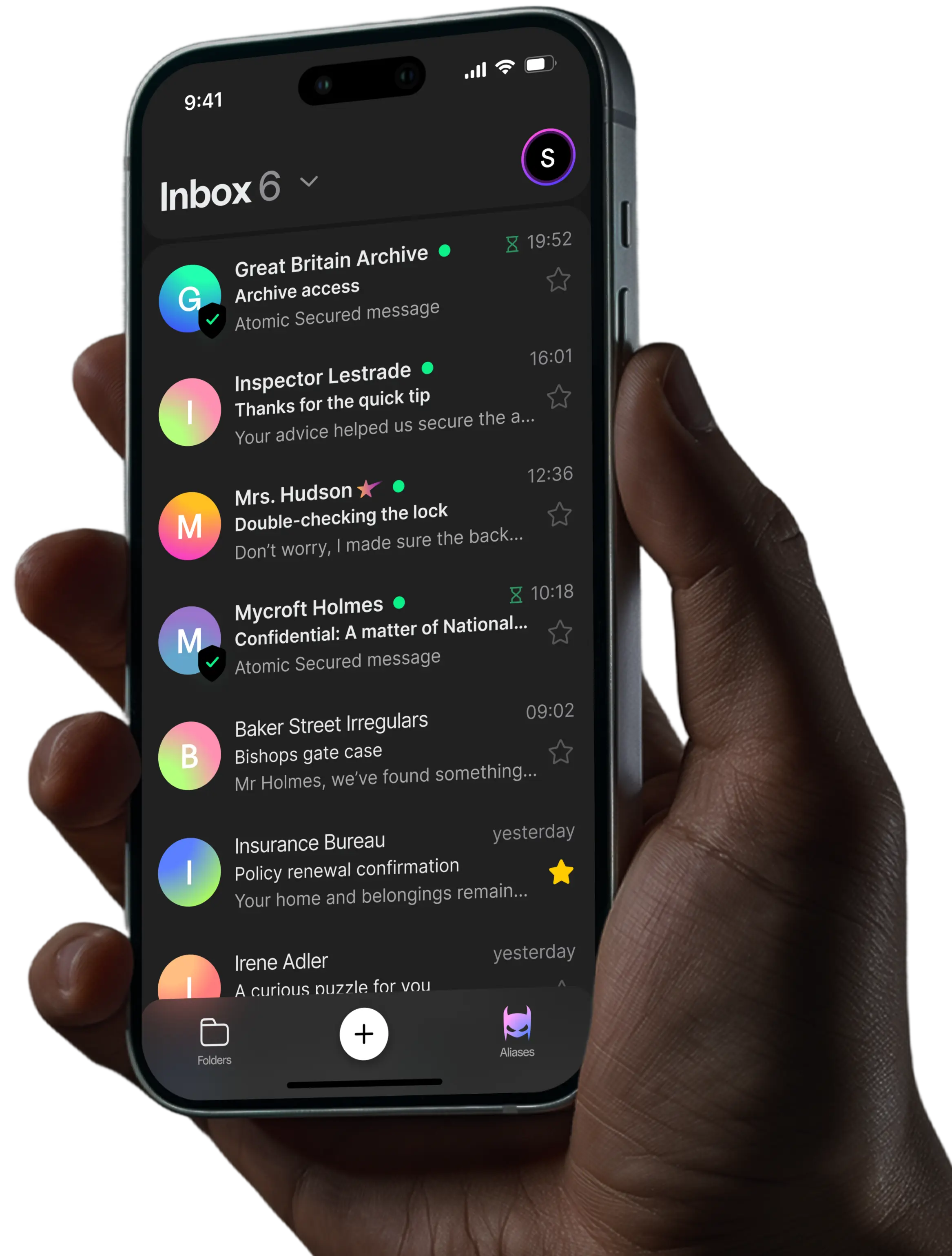
Atomic Mail app on iPhone

What's in the iPhone app

Your private inbox, built for iPhone. Free to download and ready for iOS 16 or later.

End-to-end encryption

End-to-end encrypted mail and attachments

Messages and attachments between Atomic Mail users are encrypted with AES-256, RSA-2048 and ECIES, so only you and your recipient can read them.

Zero-access encryption

Zero-access storage

Your mailbox is stored encrypted, so Atomic Mail has no technical way to read it. No master key, no backdoor.

Hide-my-email alias

No phone number to sign up

Create your address in the app without a phone number or a second email. Your inbox isn't tied to your identity.

Self-destructing messages

10 free aliases

Give apps, shops and newsletters an alias instead of your real address, so your main inbox stays private.

Secure servers

Private mail to anyone

Send password-protected or self-destructing messages to people on Gmail, Outlook or iCloud, straight from your iPhone.

Email without phone number

AI spam and phishing protection

Built-in filtering catches spam and phishing attempts before they reach your inbox.

How to get Atomic Mail on your iPhone

Setting up takes a few minutes. You don't need a phone number, a second email address or any changes in the iPhone Mail app.

Download the app from the App Store

Tap the download button on this page, or search for Atomic Mail: Private Email in the App Store. The app is free and needs iOS 16 or later.

Create your address

Open the app, create an account and choose your address. There's no phone number step and no personal details to fill in.

Save your seed phrase

At signup you get a seed phrase. It's how you recover your account if you forget your password or lose your iPhone, because Atomic Mail doesn't hold your keys. Write it down and keep it offline.

Create aliases for sign-ups

Set up aliases for shopping, newsletters and new apps so your main address stays private. The free plan includes 10.

Already have an account? Just sign in

If you use Atomic Mail on the web, Mac, Windows or Android, sign in with the same account and your mail is there. Since version 1.5 you can add several mailboxes and switch between them in the app.

What makes an iPhone email app private?

The Mail app on your iPhone is only a window into your inbox. Privacy depends on the provider behind it: who holds the encryption keys, what they can read and what they know about you.

Here's what to look for:

Keys only you hold. Encryption should happen with keys on your device, not on the provider's servers.

End-to-end encryption. Messages stay encrypted from your iPhone to your recipient, not just in transit.

Zero-access storage. Stored mail should be unreadable to the provider, so a server breach exposes nothing readable.

Minimal personal data. Signing up shouldn't require a phone number. Atomic Mail's App Store privacy label reads Data Not Collected.

Aliases for sign-ups. Giving sites an alias keeps your real address out of breach databases and marketing lists.

Atomic Mail vs Apple Mail with iCloud

Apple Mail is the app that comes with your iPhone, and iCloud Mail is the free address many people use in it. Here's how that setup compares with Atomic Mail.

Features
Atomic Mail
iCloud MailiCloud Mail
Encryption options
4
1
Aliases
10 free aliases for each email account
3 free aliases for each email account
Data privacy
Advanced
Limited
Spam & phishing protection
Advanced
Moderate
Where your mail is stored
Germany (EU)
Apple data centres
No ads
End-to-end encryption
Zero-access encryption
Anonymous registration
Free unlimited storage
Seed phrase account recovery
Email without phone number
No personal data required
Use in the iPhone Mail app (IMAP)
Not yet (on roadmap)
See the full Atomic Mail vs iCloud Mail comparison
For teams

Business email on your iPhone

Want your work address on your iPhone? With Atomic Mail Business, your team gets email on your own domain, such as you@yourcompany.com, plus end-to-end encryption, shared addresses like hello@ and admin controls. Work mail opens in the same Atomic Mail iPhone app, with plans from $3 per user per month.

Explore business email

The iPhone app at a glance

Price

Free. Atomic Plus is an optional in-app upgrade.

Compatibility

iPhone with iOS 16 or later.

Account

Create a new address in the app or sign in to an existing one.

Privacy label

Data Not Collected, as listed on the App Store.

Multi-account

Add several Atomic Mail mailboxes and switch between them.

Recovery

Seed phrase instead of a phone number.

Data location

ISO 27001-certified data centres in Germany.

Other platforms

Android, Mac, Windows and web, with the same account.

Atomic Mail for iPhone: FAQ

Is the Atomic Mail iPhone app free?

Yes. The app is free to download, and the free plan includes end-to-end encryption, 10 aliases and unlimited storage. Atomic Plus is an optional upgrade for $5.99 a month or $59.90 a year.

How do I upgrade to Atomic Plus on iPhone?

In the app, tap your profile icon in the top-right corner and choose Upgrade to Atomic Plus. Plus adds 15 aliases, Hide My Email, a custom signature and AI writing tools.

Can I add Atomic Mail to the iPhone Mail app?

Not yet. Atomic Mail doesn't offer IMAP or SMTP access today, so it can't be added to the built-in Mail app. It's on the roadmap. For now, use the Atomic Mail app.

Is email in the Atomic Mail app end-to-end encrypted?

Yes. Messages and attachments between Atomic Mail users are end-to-end encrypted, and your mailbox is stored with zero-access encryption, so Atomic Mail can't read it.

Do I need a phone number to sign up on iPhone?

No. You can create an account in the app without a phone number or another email address. Your account is recovered with a seed phrase instead.

Which iPhones does Atomic Mail work on?

Any iPhone running iOS 16 or later.

Can I use more than one account in the iPhone app?

Yes. You can add several Atomic Mail mailboxes and switch between them in the app.

What happens if I lose my iPhone?

Install Atomic Mail on your new iPhone and sign in, or recover your account with your seed phrase. Because Atomic Mail doesn't hold your keys, keep that phrase somewhere safe and offline.

Download Atomic Mail for iPhone

Here's what you get in the app:

  • End-to-end encryption for messages and attachments between Atomic Mail users
  • Zero-access storage so we can't read your mailbox
  • No phone number needed to create your account
  • 10 free aliases to keep your real address private
  • Password-protected and self-destructing email for people on any provider
  • AI spam and phishing protection built into the app
  • Unlimited storage on the free plan
  • Seed phrase recovery instead of a phone number
  • Same account everywhere on Android, Mac, Windows and web

Free on the App Store. Works on iOS 16 or later.

Download on the App Store
Other ways to get it
AndroidMacWeb appAll downloads
Atomic Mail encryption
App Store

Get Started Today

Get Started

Company

AboutTerms of ServiceTerms of Service AgentsFAQPress KitEmail for AI agentsllms.txt

Privacy

Privacy PolicyPrivacy Policy AgentsSecurity Whitepaper

Compare To

GmailProton MailOutlook
Yahoo Mail
iCloud MailFastmailZoho MailTuta MailMailfencePosteoStartMailHushmail

Features

Email AliasEnd-to-End EncryptionZero Access EncryptionAccount Recovery Seed KeywordsFree Email Without Phone NumberAI Email AssistantAI Email Writer

Academy

Secure EmailEncrypted EmailPrivate EmailAnonymous EmailAd-free EmailGDPR Compliant Email Free EmailFast EmailPersonal EmailBusiness EmailCrypto Email
support@atomicmail.io
Atomic Mail Agentic - Let your agents read, send, and react to email autonomously | Product Hunt

Get the app

AtomicMail Systems OÜ

Harju maakond, Tallinn, Kesklinna linnaosa, Harju tn 3 // Vana-Posti tn 2, 10146

© * Atomic mail

All Rights Reserved

Company

AboutTerms of ServiceFAQPress KitEmail for AI agents

Privacy

Privacy PolicySecurity Whitepaper

Compare To

GmailProton MailOutlookYahoo MailiCloud MailFastmailZoho MailTuta MailMailfencePosteoStartMailHushmail

Features

Email AliasEnd-to-End EncryptionZero Access EncryptionAccount Recovery Seed KeywordsFree Email Without Phone NumberAI Email AssistantAI Email Writer

Academy

Secure EmailEncrypted EmailPrivate EmailAnonymous EmailAd-free EmailDisposable Temporary EmailGDPR Compliant Email Free EmailFast EmailPersonal EmailBusiness EmailCrypto Email
Secure EmailEncrypted EmailPrivate EmailAnonymous EmailAd-free EmailDisposable Temporary Email
GDPR Compliant Email Free EmailFast EmailPersonal EmailBusiness EmailCrypto Email
support@atomicmail.io
Atomic Mail Agentic - Let your agents read, send, and react to email autonomously | Product Hunt

AtomicMail Systems OÜ

Harju maakond, Tallinn, Kesklinna linnaosa, Harju tn 3 // Vana-Posti tn 2, 10146

© * Atomic mail

All Rights Reserved