

TL;DR
- Identity theft is when someone uses your identity pieces (email access, passwords, phone number, ID data) to become you in systems that matter.
- Most identity theft starts with a breach, a phishing message, a reused password, or a sloppy recovery setting. Then it snowballs.
- Identity theft prevention is multi-layered: freezing/locking credit and setting up alerts, hardening email accounts, using aliases, creating strong passwords and adding robust MFA, and reducing OSINT.
- Best identity theft protection = detect early: login alerts, transaction alerts, credit monitoring, and breach checks. If something’s leaked, change it everywhere it was reused.
- If it happens: secure email, kill sessions/rules/forwarding, reset high-value accounts, contact banks, freeze/flag credit, save evidence, then file official reports for case numbers.
What Is Identity Theft
Identity theft is when a criminal uses your personal data to impersonate you – to open accounts, take over existing ones, convince support agents, reroute money, or manipulate people who trust your name.
In practice, identity theft often looks like account takeover + paperwork. They don’t need your whole identity, they need enough identity to pass a checkpoint.
Why and who is the target?
Identity theft is industrial. It targets volume (random people from a data breach), opportunity (anyone who reuses passwords), and value (founders, finance teams, influencers, executives, anyone with money or authority).
A student with a stable email address is attractive for identity theft. A small business owner is even better. A CFO is a buffet.
The most stolen “identity pieces”
Criminals hunt for specific data points, often called PII (Personally Identifiable Information):
- Email access: password resets, inbox receipts, “confirm it’s you” links, security alerts.
- Passwords: especially reused ones from old breaches.
- Phone number: for SMS OTP, account recovery, SIM swap leverage.
- Government ID fragments: last digits, ID number, address, DOB.
- Device/session data: stolen cookies, “remember me” sessions.
- Trust signals: your writing style, your voice, your work role, your contacts.
- The biometrics: fingerprints and face scans (increasingly valuable).
How Identity Theft Happens
Identity theft is a supply chain. It moves through three distinct phases: Acquisition, Infiltration, and Monetization.
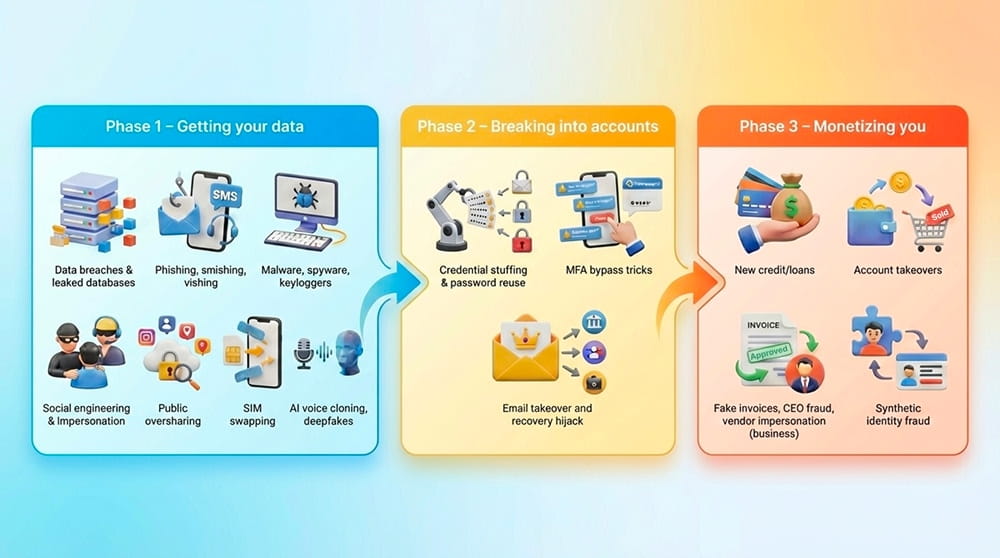
Phase 1 – Getting your data
- Data breaches & leaked databases: Companies are often hacked, and your PII ends up on the dark web in bulk.
- Phishing, smishing, vishing: You get an urgent email (phishing), an SMS about a "delivery" (smishing), or a call from "the IRS" (vishing). The goal is always the same: make you hand over access.
- Malware, spyware, keyloggers: A shady attachment or cracked app can capture keystrokes, browser sessions, even clipboard contents.
- Social engineering & impersonation: Hackers manipulate you psychologically by posing as tech support or a distressed friend to gain access to your devices.
- Public oversharing (social media + OSINT): Your job title, pet’s name, school, travel posts, even a photo of your desk badge. OSINT makes identity theft cheaper.
- SIM swapping and carrier takeovers: A thief convinces your mobile carrier to switch your phone number to their SIM card, intercepting all your 2FA codes.
- Modern threat: AI voice cloning & deepfakes: AI tools need just 3 seconds of audio from your social media to clone your voice, allowing thieves to bypass biometrics, stage convincing kidnapping hoaxes, or impersonate executives to authorize fraudulent wire transfers.
Phase 2 – Breaking into accounts
- Credential stuffing & password reuse: Bots take leaked credentials and try them on email, banks, social, shopping. One reused password can trigger a full identity theft chain reaction.
- MFA bypass tricks: Hackers spam your device with login requests until you click "Approve" by accident, accept it out of annoyance (Push Fatigue), or fall for a fake "support" call demanding your OTP code.
- Email takeover and recovery hijack: The most critical failure point in identity theft. If they get into your inbox, they click “Forgot Password” to hijack all connected accounts, from shopping and socials to banking and work tools.
- Traditional email is a prime target because it acts as a data-collecting machine that maps your entire life: who you are, your phone number and location, who you pay, the services you use, and the messages you write.
- A secure, private email service like Atomic Mail is built to reduce that exposure: it doesn’t demand unnecessary personal data, doesn't collect your personal info, and it’s designed around privacy and seamless encryption – key moves for identity theft protection.
- Session hijacking: Malware steals your browser's "cookies", allowing hackers to enter your accounts without even knowing the password.
Phase 3 – Monetizing you
- New credit/loans: They open credit cards or take out massive personal loans in your name, max them out, and vanish.
- Account takeovers: They drain your crypto wallets, transfer savings, or buy expensive electronics on your Amazon account to resell.
- Fake invoices, CEO fraud, vendor impersonation (for businesses): A single convincing email thread can reroute a six‑figure payment. Identity theft becomes “approved by the boss.”
- Synthetic identity fraud: They could blend your real info with invented details to build a new, durable identity that passes checks.
Risks of Identity Theft for You
The consequences of identity theft extend far beyond a disputed charge on your credit card statement. It is a blast radius that hits your finances, your health, and your peace of mind.
Effective identity theft prevention is the only barrier between you and these devastating outcomes.
How To Know If Someone Stole Your Identity
Often, you won't realize until it's too late. Sophisticated thieves, especially those using synthetic identity fraud, are patient. However, if you know where to look, you can spot trouble before it starts.
Fast red flags
- You receive multiple password resets that you didn’t request. Classic identity theft probing.
- You see sudden account lockouts.
- Your bank app shows a new payee, new device, or “security update” you never did.
- You stop receiving emails from a service you use (because an attacker created an inbox rule to hide their tracks).
- Your phone suddenly loses service or your carrier says “your SIM was changed.”
Inbox-specific signs
If identity theft starts anywhere, it often starts here.
- New forwarding address or auto‑reply you didn’t set.
- Filters/rules that move security emails to archive/trash.
- Login alerts from strange locations or “new device signed in.”
Financial + credit signals
- You see an unknown small charge (e.g. $1 at a gas station in a state you've never visited). This is a "ping test" – thieves checking if the card is active before draining it.
- A sudden drop in credit score or the appearance of "hard inquiries" (checks by lenders) that the consumer did not initiate
- You see a hard credit inquiry you don’t recognize.
- A debt collector calls about a loan you never touched.
- Your “buy now pay later” account shows an order shipped to a different address.
Identity Theft Prevention
“Be careful online” is not identity theft prevention. This is:
1) Freezes, locks, and alerts
- Go to your country’s major credit reporting agencies (like Equifax, Experian, and TransUnion if you are in the US) and "freeze" your credit, so even you can't open a new credit card or loan without a special PIN. It is free, reversible, and the single most effective step you can take today.
- Turn on bank/card alerts for transactions, new payees, and login attempts.
- Use account security alerts anywhere you can.
2) Inbox protection
Identity theft usually starts with email because email resets everything.
- Treat your inbox as a master key.
- Ditch the "data broker" email providers that scan your life for ads. Choose a secure, private email service.
3) Split your digital identity
One email for everything is convenient… for identity theft. Use separate addresses/aliases for banking, work, shopping, newsletters.
In Atomic Mail, you can create up to 10 aliases for free.
4) Authentication hygiene
Identity theft loves lazy authentication. Don’t feed it.
- Use strong, unique passwords or passphrases. Use a secure password manager to generate 20-character chaotic passwords for every account.
- Use MFA that isn’t easy to steal: skip SMS when possible (vulnerable to SIM swapping) and use an authenticator app or a hardware key.
- Audit recovery options: old numbers, old emails, weak security questions.
5) Don’t let your phone number be your skeleton key
SIM swaps are identity theft accelerators.
- Move critical accounts away from SMS MFA.
- Contact your mobile provider and ask to add a "Port Freeze" or "Carrier PIN" to your account. This requires a unique code before your number can be transferred to a new SIM.
6) Reduce what attackers can learn about you
OSINT turns identity theft into a low-cost hobby.
- Don’t overshare. Attackers love “life trivia.”
- Remove old public profiles you don’t use.
- Don’t post “answer-shaped” content (pet names, school mascots, vacation dates).
- Be wary of apps asking for facial scans for low-stakes tasks. Biometric data is forever – once leaked, you don’t get a new face.
7) Remember daily habits that make identity theft harder
- Avoid public Wi-Fi (as public networks make identity theft interception easier). If you must connect, use a secure VPN.
- Keep documents safe: encrypt cloud storage, protect your laptop/phone with a strong passcode.
- Don’t share personal info with strangers (even “small” bits).
- Verify requests out-of-band: if someone asks for money, codes, or a “quick favor,” confirm via a second channel you initiate.
- Update devices and browsers: patched systems close the boring holes malware uses.
- Be careful with app permissions: flashlight apps don’t need contacts; random tools don’t need SMS.
- Treat QR codes and short links as suspicious: they’re perfect for phishing.
- Watch your back: when entering PINs or passwords in public, shield your hand.
8) Monitor the right things
Identity theft protection works best when you detect early.
- Turn on login alerts.
- Turn on transaction alerts.
- Watch credit for new inquiries/accounts (in your country’s system).
- Check breached data. Use services like Have I Been Pwned to see if your data is already on the dark web. Pay attention to built-in warnings (for example, Apple Passwords sends compromised password alerts). If you see leaked credentials, change info everywhere it was reused, rotate recovery options, and upgrade MFA.
If It Happens: The Identity Theft Response
Panic is your enemy, but speed is your weapon:
- Change passwords for email, banking, and other high-value accounts from a clean device (to ensure no malware captures the new keystrokes). Enable strong MFA.
- Review account recovery settings everywhere.
- Call your bank/payment providers and freeze what you can. Place a fraud alert (where available).
- Call the fraud department of any company where an account was opened. Ask for the account to be closed and request a letter confirming you aren't liable for the debt.
- Save evidence: screenshots, email headers, transaction IDs, dates/times.
- Replace compromised IDs/cards.
- Dispute fraudulent accounts/charges.
- If you suspect malware, disconnect your computer from the internet and run a deep antivirus scan. Do not log into sensitive accounts until the device is clean.
How To Report Identity Theft
Identity theft reporting is annoying, but it matters. Reports create case numbers that unlock reversals.
Who to contact
- Financial institutions (bank, card, crypto exchange) – fastest to stop losses.
- Email provider + key platforms (where takeover happened).
- Credit bureaus / national equivalents to freeze/flag identity theft.
- National reporting portal (like IdentityTheft.gov / Action Fraud) for an official trail.
- Local police, if you know the thief or if a creditor explicitly demands it.
What to prepare before you report
- What happened (one paragraph)
- When you noticed it (timestamps)
- What accounts were hit
- Money amounts + transaction IDs
- Any attacker contact info (emails, numbers, wallet addresses)
FAQ: Identity Theft
What is identity theft?
Identity theft is when someone uses your personal data (email access, passwords, phone number, ID details, etc.) to impersonate you and take over accounts, open new ones, or reroute money and trust.
Is identity theft the same as account takeover?
Not exactly. Account takeover is usually one account. Identity theft is broader, using your identity to unlock multiple systems (credit, banking, healthcare, taxes, business tools).
What are the first signs of identity theft?
Unexpected password resets, MFA prompts you didn’t trigger, new devices logged in, missing security emails, credit inquiries you don’t recognize, or phone service suddenly dropping (SIM swap).
What is the best identity theft protection?
Layered protection: lock/freeze credit where available and turn on financial alerts; secure your inbox (strong password + strong MFA) because it resets everything; use aliases/separate emails for high‑risk categories; monitor breaches and rotate leaked credentials fast..
How do I report identity theft?
Start with the institutions that can stop the damage: your bank/card providers, the platforms that were taken over, credit bureaus or national equivalents (freeze/flag), and official reporting portal / law enforcement for a case number.
Where do I report identity theft in the US?
Use the FTC portal: https://www.identitytheft.gov/ – it guides you through reporting and gives a recovery plan.
Does a secure private email service help?
It helps by reducing exposure and making your “reset hub” harder to compromise. Pair it with good MFA, unique passwords, and aliases – no single tool is a magic shield for identity theft.