



It’s the end of the month and you’re going through the company card statement. There’s the CRM, an email sequence tool, Zapier, a form builder, a scheduling app, and a helpdesk that two people log into. There’s also a $49 charge nobody can explain. Everyone agrees the stack is too big, and nobody wants to cancel anything in case it breaks the lead flow.
And after all that software, someone on the team still spends an hour a day copying details out of emails and pasting them somewhere else.
This article is about that hour. It shows how to use Lovable for email automation: building the small, specific email tool your team actually needs, with the prompts to start it, what it costs, and how to keep your customers’ emails private along the way.
- Lovable is an AI app builder. You describe a tool in plain English and it builds a working web app with a database, logins, and backend code.
- It can automate email, but it doesn’t send or receive email itself. It builds the app and the logic, then hands sending to a provider like Resend and receiving to an inbox your app can read.
- Good things to build: a shared lead inbox, lead routing, onboarding reminders, a support reply dashboard, and internal approval alerts.
- Cost: Lovable has a free plan; paid plans start at $25 a month. Resend’s free tier covers 3,000 emails a month (capped at 100 a day).
- Can it replace SaaS subscriptions? Some of them. It’s best at replacing the glue tools and manual copy-paste between apps, not your CRM or email infrastructure.
- The catch: customer emails passing through AI need clear data rules, and a production app needs more care than a first prototype.
What is Lovable?
Lovable is a tool for building web apps by chatting. You type something like “build a dashboard where my team can see new leads and assign them,” and it writes the code, sets up a database, and shows you a live preview. Then you keep refining it in plain language.
People call this “vibe coding.” For businesses, the useful part is simple: someone who understands the workflow can now build a working internal tool without waiting months for a developer. It’s closer to sketching an app than to writing one.
It also comes with a built-in backend called Lovable Cloud (built on Supabase). That covers user logins, a database, edge functions for server-side code like sending email, and scheduled jobs for anything that runs on a timer.
How much does Lovable cost?
According to Lovable’s plan documentation, the Free plan gives you 5 build credits a day (up to 30 a month), enough to try an idea. Pro starts at $25 a month for 100 credits, and Business starts at $50 a month. Every plan includes a small monthly allowance for Lovable Cloud hosting; heavier database use costs extra. Small edits use under a credit each, so a simple internal tool usually fits comfortably in a Pro plan while you build it.
Prices change often, so check lovable.dev/pricing before you budget.
Where Lovable fits into email automation
This is the part most people get wrong. Lovable isn’t an email provider. It doesn’t host inboxes and it doesn’t deliver mail on its own. Lovable’s own FAQ says you need an external provider for production sending.
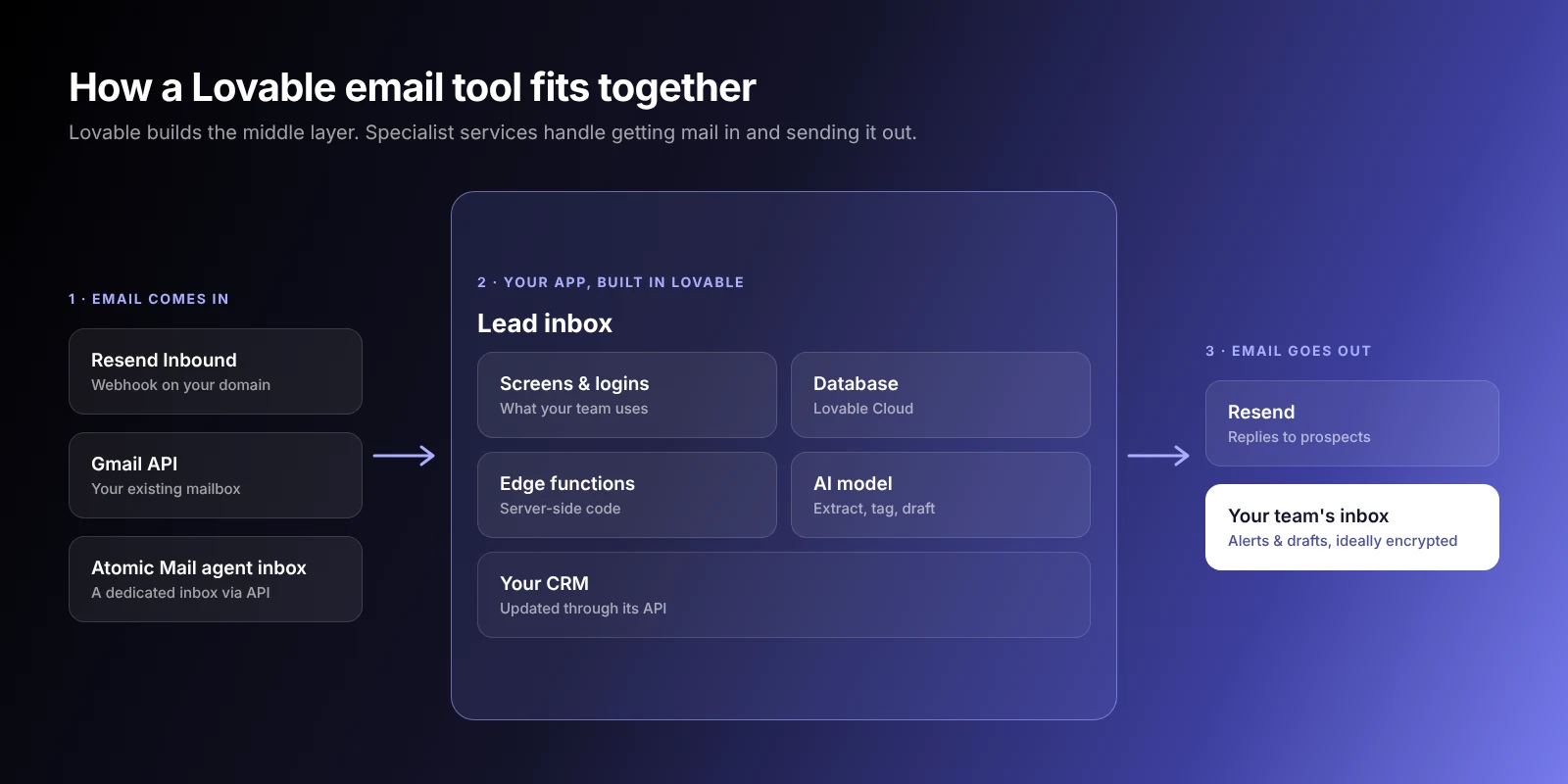
Think of it as the layer in the middle. It holds your business logic and the screens your team uses, and it talks to the services that do the specialist work.
| Layer | What it does | Example |
|---|---|---|
| Your app | The screens, rules, and data your team works with | Built in Lovable |
| Backend | Stores records, runs code, runs things on a schedule | Lovable Cloud |
| Inbound email | Gets incoming email into your app | Resend Inbound, Gmail API, an agent inbox |
| Outbound email | Delivers the emails your app sends | Resend, SendGrid, Mailgun |
| The person | Reads the email | Your customer or teammate |
Resend has a native Lovable connector. You bring your own account and API key, and Resend bills you for sending, not Lovable. Its free tier covers 3,000 emails a month with a limit of 100 a day, which is plenty for most internal tools. If your tool emails customers in bulk, plan for the $20-a-month Pro plan, which removes the daily cap.
How do incoming emails get into a Lovable app?
Sending is the easy half. Most useful email tools also need to read email, and there are three common ways to do it:
- Inbound parsing through your email provider. Resend Inbound receives mail at an address on your domain (you add an MX record, ideally on a subdomain like leads.yourcompany.com), parses the message and attachments, and posts it to a webhook. In Lovable, that webhook is an edge function that saves the email to your database. This is the simplest option for a new address.
- Connecting an existing mailbox. If leads already arrive at a Gmail or Google Workspace address, your app can read it through the Gmail API. It works with the address customers already know, but setting up Google sign-in and permissions takes the most effort of the three.
- A dedicated inbox for your app. Atomic Mail’s Email API for AI agents gives software its own inbox that it can read and reply from through an API, with no human account behind it. It’s currently in free open alpha, so it suits pilots and internal tools more than mission-critical flows today.
A simple forwarding rule from your main inbox to any of these addresses gets you started without changing what customers see.
5 email automation tools you could build with Lovable
1. AI-powered shared inbox
A small agency gets client requests at one shared address and three people answer them. Today they pay a per-seat helpdesk mostly to see who’s handling what. A Lovable app can pull those emails into a simple board, let AI tag each one (billing, new project, bug), and show who claimed it. That’s the only part they were actually paying for.
2. Lead qualification and routing
Website inquiries land in a form or an inbox. The app reads each one, pulls out the company, budget, and request, scores it against your own criteria, and sends it to the right salesperson by email. Big deals go to the founder, small ones to the team queue, spam goes nowhere.
3. Customer onboarding workflows
A bookkeeping firm signs a new client and needs three things from them: bank statements, a signed engagement letter, and access to their accounting software. Right now someone checks a spreadsheet and sends reminders by hand, and half the time they chase a client for something that already arrived. A Lovable app can track what’s come in and email the client only about what’s still missing, every few days, until the file is complete.
4. AI support reply dashboard
A property management company gets 40 tenant emails a day, and most are about the same handful of things: repairs, rent receipts, parking, lease renewals. The app lists each email with an AI-drafted reply based on the company’s own policies. Someone reads it, fixes anything off, and hits send. Nothing goes out without a person approving it, which matters when the AI gets a lease detail wrong.
5. Internal approvals and notifications
Someone submits a discount request, a refund, or a purchase over a set amount. The app emails the approver with the details and two buttons, approve or reject, then notifies the requester with the result. It’s the kind of process that usually lives in a messy email thread.
Why build instead of buying another SaaS tool?
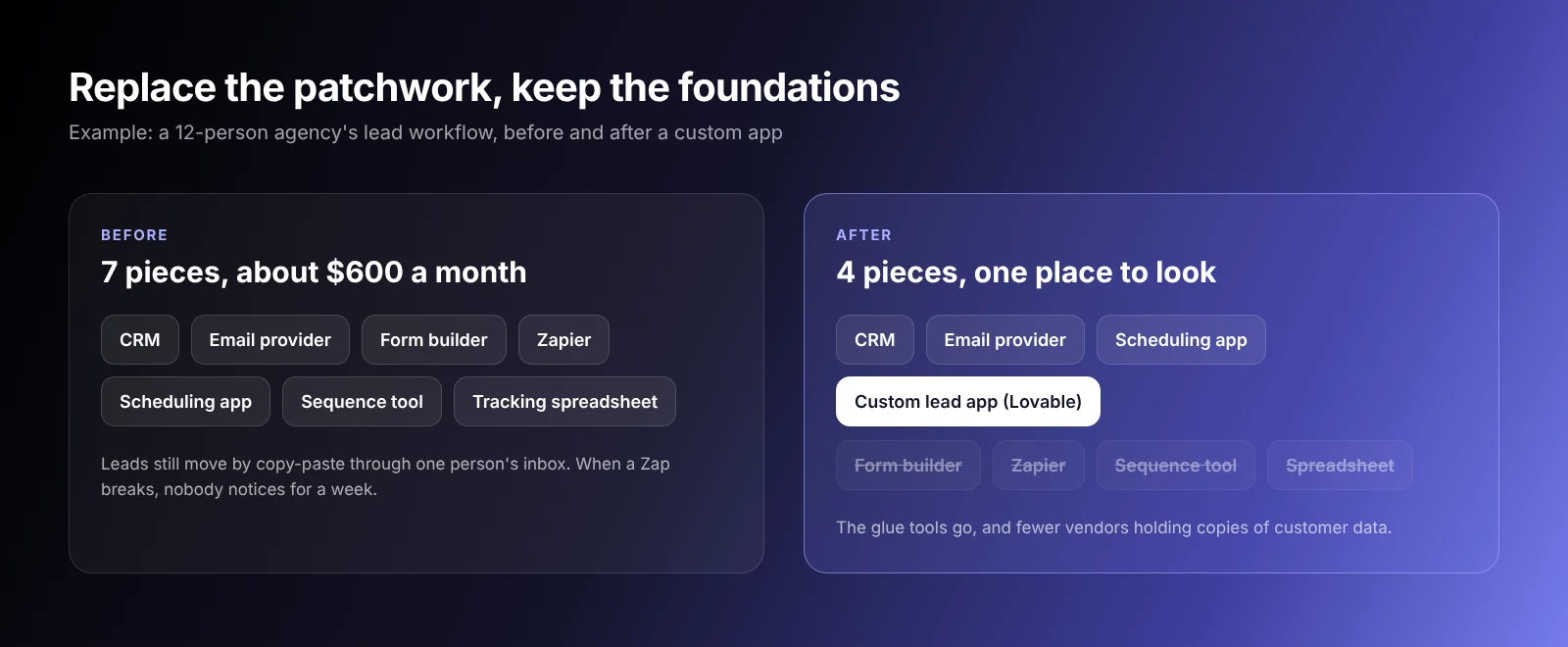
Here’s how a typical stack grows. A 12-person agency starts with a CRM. They add a form builder because the CRM’s forms are clunky, then Zapier to get form entries into the CRM. Then a scheduling tool for discovery calls, and another Zap to connect that. Then a sequence tool for follow-ups. Each purchase made sense on the day it happened.
Two years later they’re paying around $600 a month, and the real workflow (getting a lead from first email to a booked call) still runs through one person’s inbox. When a Zap quietly breaks, nobody notices for a week, and the leads it dropped are just gone.
The fix is smaller than it sounds. You keep the CRM and the email provider, and replace the patchwork in the middle with one app built around how that agency actually handles a lead. Fewer vendors hold copies of your customer data, and when something goes wrong there’s one place to look.
Example: building an AI lead inbox with Lovable
Picture a five-person sales team that gets about 20 leads a day by email. For each one, someone opens the message, figures out what the prospect wants, copies their details into the CRM, decides who should take it, writes a reply, and updates the tracking spreadsheet.
None of those steps is particularly difficult. The ridiculous part is that a person has to do all of them, every time. And because it’s tedious, it gets done in batches, so a promising lead that arrived at 9am might not hear back until after lunch.
A simple Lovable app can sit in the middle and turn that into this:
- An email arrives at the sales address and is forwarded to the app’s inbound address.
- Information is extracted: name, company, what they want, and any budget or timeline they mention.
- The lead is categorized as a new project, a pricing question, a partnership pitch, or noise.
- The CRM is updated with a new contact, or a note on the existing one.
- An owner is assigned using the team’s own rules. Enterprise leads go to the head of sales, everything else goes into rotation.
- A reply is drafted in the team’s tone, referencing what the prospect actually asked.
- A human approves it. The owner opens the app, reads the draft, edits anything that’s off, and sends.
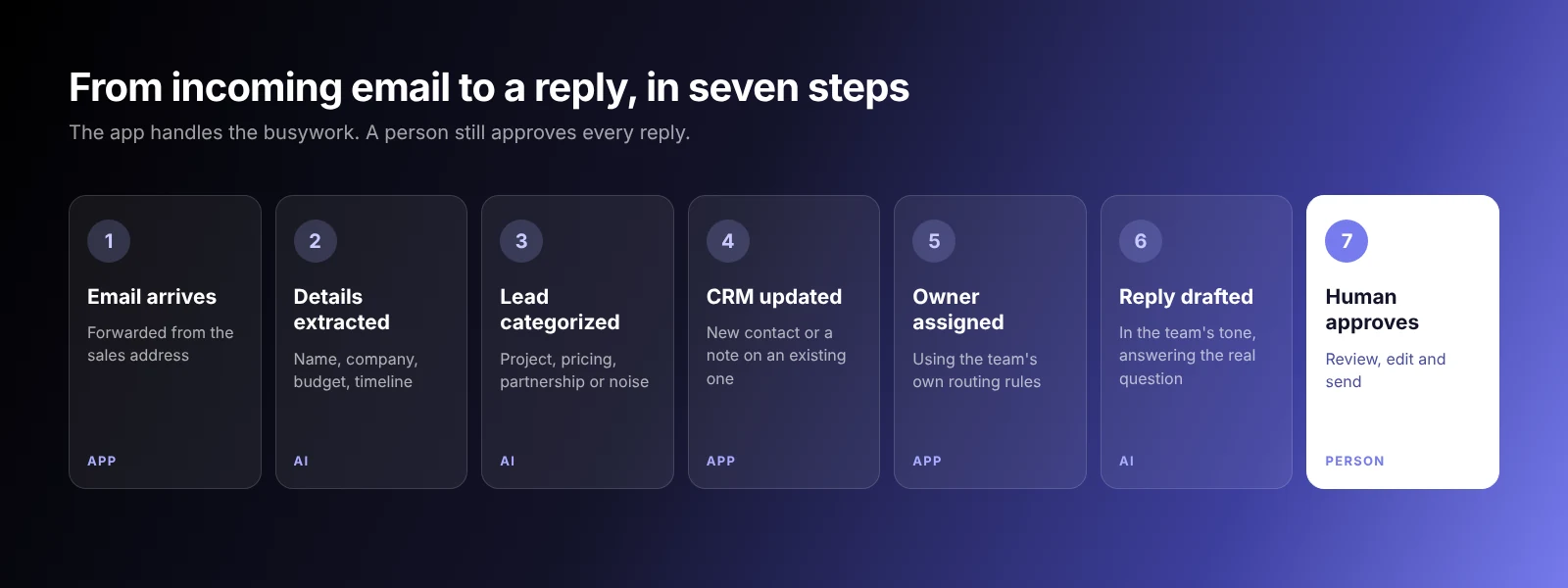
The team still talks to every prospect. What disappears is the copying, the pasting, and the daily argument over whose turn it was.
Under the hood it’s only a few pieces:
| Layer | Tool |
|---|---|
| App and interface | Lovable |
| Database and backend | Lovable Cloud (Supabase under the hood) |
| Receiving email | Resend Inbound, the Gmail API, or an agent inbox |
| Sending email | Resend, through Lovable’s connector |
| Extraction and drafts | An AI model, called from an edge function |
| Customer records | Your existing CRM, through its API |
The prompts to build it, step by step
Build it in stages, and get each stage working before you add the next. These are the prompts we’d start with. Paste them into Lovable one at a time and adjust the details to your team.
Prompt 1: the inbox and the data
Build an internal lead inbox for a 5-person sales team. Use Lovable Cloud. Create a “leads” table with: sender name, sender email, company, subject, full message, received date, category, budget, timeline, owner, status (new, drafted, sent), and draft reply. Show a table of leads, newest first, with filters for status and owner. Clicking a lead opens a detail panel with the full message. Require login on every page, and only allow users with an @ourcompany.com email to sign up.
Prompt 2: receiving real email
Create an edge function that receives a webhook from Resend Inbound when a new email arrives. Save the sender, subject, body and received date as a new row in the leads table with status “new.” Verify the webhook signature, store the signing secret in project secrets, and ignore duplicate messages with the same message ID. Log any failures to an “errors” table so we can see them.
Prompt 3: extraction, routing and drafts
When a new lead is saved, call the AI model with only the latest message (not earlier thread history or attachments). Extract company, budget and timeline, and classify it as new project, pricing question, partnership, or spam. Assign the owner: budgets over $20,000 go to Anna (head of sales); everything else rotates between Ben, Carla and David. Then draft a short, friendly reply that answers what the prospect asked and suggests a call. Save the draft; never send it automatically. Add a “Send” button on the detail panel that sends the edited draft through Resend from sales@ourcompany.com and sets the status to “sent.”
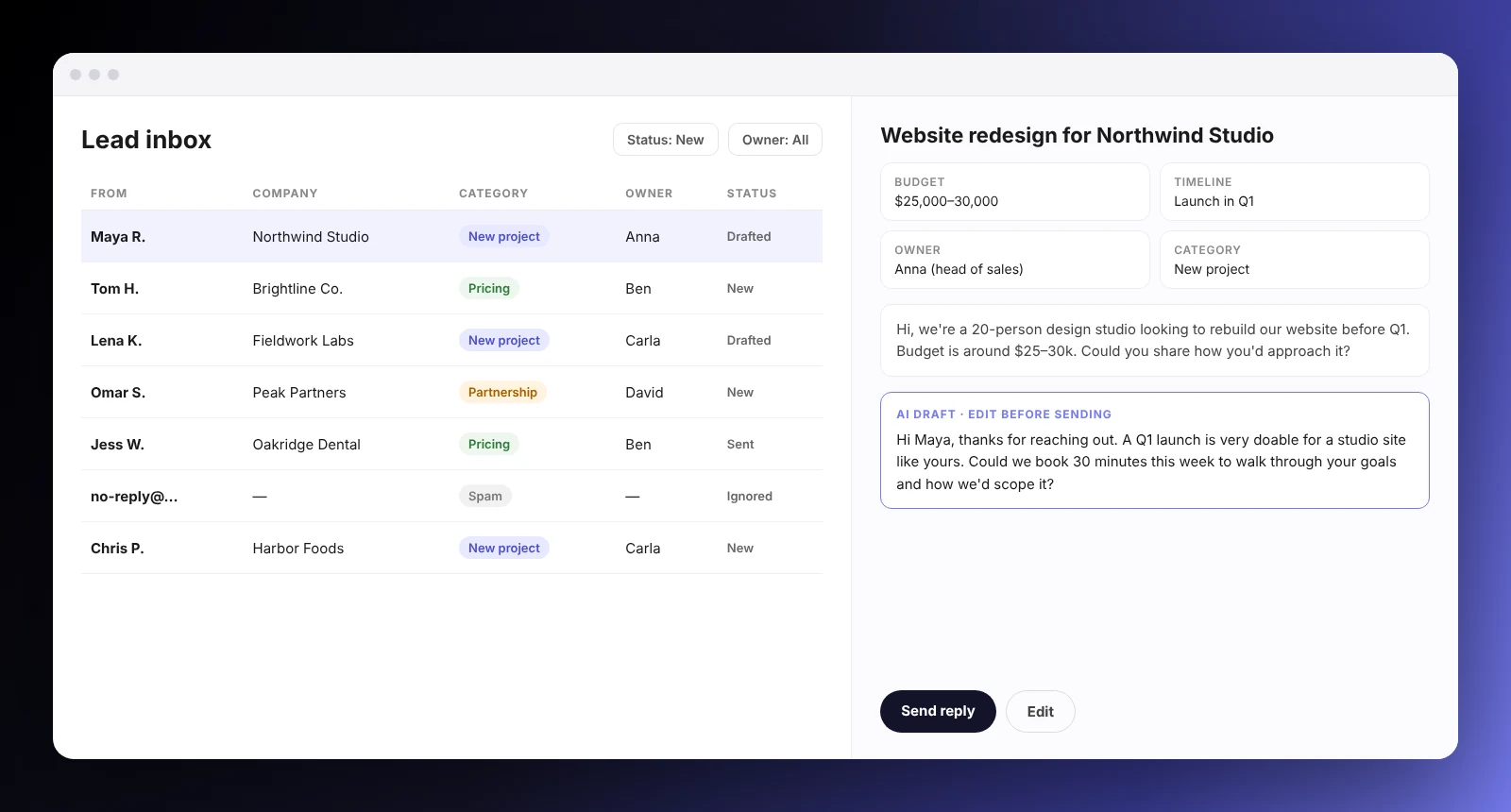
A rough version can run within a few days. Connecting the real inbox and the real CRM is where most of the effort goes, and it’s worth getting right before the team depends on it.
What about privacy?
Go back to that sales team. A single inbound email might include the prospect’s budget, a competitor’s quote they’re unhappy with, and a draft contract as an attachment. The moment your app passes that to an AI model, you’ve made a decision about where that information goes. Before you build anything like this, get clear answers to a few questions:
- What’s being sent? The whole email thread, attachments included, or just the latest message? Strip what the AI doesn’t need.
- Where is it processed? Which AI provider, and in which region?
- Is it stored or used for training? Check the provider’s retention policy and your API settings, not the marketing page.
- Who in your team can see it? Ask Lovable to require login on every screen and limit each record to the people who should see it. Then test it with a second account.
- Where do the keys live? API keys belong in your project’s secrets, never in the code.
The basics of sending still matter too. Set up SPF, DKIM, and DMARC on your domain so your emails don’t land in spam and nobody can easily spoof you. Your email provider gives you the exact records.
Don’t forget the inbox at the other end
There’s also the receiving end. The alerts, approval requests and AI drafts your tool sends usually land in your own team’s inboxes, often with client budgets and contract details inside. If you’re careful about what the AI sees, it makes sense to be just as careful about where those messages end up.
That’s where the inbox itself matters. An encrypted email service like Atomic Mail uses end-to-end encryption and keeps your private keys off its servers, and its essential features, encryption included, are free. You can also create an email alias for each workflow (approvals@, leads@) so tool notifications stay separate from your personal mail and can be switched off in one click if an address starts attracting spam. Find out more about what makes a private email provider different.
When Lovable makes sense, and when it doesn’t
A $20-a-month tool that already does exactly what you need? Keep it. Building your own would cost more in time than you’d ever save. Paying $600 a month across several products while people still copy data between them by hand? That’s when custom software gets interesting.
| Good fit | Probably not worth it |
|---|---|
| Your workflow is specific and no tool matches it well | A cheap off-the-shelf tool already does the job |
| You’re paying for several tools to run one process | You need large-scale email marketing with advanced segmentation |
| Your team copies data between apps by hand | Nobody on your side has time to own and maintain it |
| You want control over where customer data lives | It needs strict compliance sign-off you can’t get for a custom build |
| The volume is moderate and mostly internal | It’s mission critical from day one with no room for a learning curve |
Getting from a Lovable prototype to a real business tool
Back to the sales team one more time. Say someone on the team built a working version of the lead inbox over two weekends. It looks great in the demo. Then it goes live and the real questions show up. What happens when the AI model times out halfway through a batch of emails? Who can see which leads? What if two people approve the same draft? What breaks when the CRM changes its API next quarter?
A prototype can ignore all of that. A tool five people open every morning can’t. Before you roll it out, check five things:
- Access rules. Every record is visible only to the people who should see it, and you’ve tested this with a second account.
- Data structure. The database still makes sense with thousands of rows, not just the 20 from your test.
- Error handling. Failed AI calls, bounced emails and CRM errors are logged and retried, not silently dropped.
- Security review. Secrets are in project settings, webhooks are verified, and nothing sensitive is exposed in the browser.
- An owner. One named person is responsible for fixing it when it breaks and for updating it when your process changes.
Some teams have a developer in-house who can take that on. If you don’t, bring in people who build on Lovable regularly, such as agencies like RapidDev. Whoever you work with, ask them to start by reviewing what you’ve already built. A good partner will tell you which parts are fine to keep.
Can Lovable replace your SaaS stack?
Some of it.
Think about that 12-person agency again. Their CRM holds years of customer history, and their email provider has spent a decade learning how to get messages past spam filters. Rebuilding either would be a waste of time. The same goes for logins and payments, which is why Lovable itself leans on services like Resend and Stripe.
What goes is the patchwork in between: the Zaps, the form builder, the sequence tool they only used for follow-up reminders, and the spreadsheet holding it all together. A custom app takes over that middle layer and connects the CRM and email provider the way the agency actually works. For them, that could mean cancelling four subscriptions and keeping two.
Frequently asked questions
Can Lovable send emails?
Not on its own. Lovable builds the app and the server code, but production emails go through an external provider such as Resend, SendGrid or Mailgun. Lovable has a native Resend connector, so setting it up takes a few minutes.
Can Lovable receive emails?
Not directly. Your app needs an inbound source: an email provider’s inbound webhook (such as Resend Inbound), the Gmail API for an existing mailbox, or a dedicated inbox with an API, such as Atomic Mail’s Email API for AI agents.
Does Lovable integrate with Resend?
Yes. Resend is available as a native connector in Lovable. You add your own Resend API key, and Resend bills you directly for sending.
Is Lovable free?
There’s a free plan with 5 build credits a day, up to 30 a month, which is enough to prototype a simple tool. Paid plans start at $25 a month (Pro) and $50 a month (Business).
Is it safe to process customer emails with AI in a Lovable app?
It can be, if you decide what you send and where it goes. Send the AI only the text it needs, choose a provider that doesn’t train on API data, require login on every screen, store keys in project secrets, and use an encrypted inbox for the notifications your tool sends to your team.
Do I need to know how to code to use Lovable?
No, you can build a working prototype entirely in plain English. For a tool your whole team relies on, it helps to have someone technical review security, error handling and integrations before launch.
Final thoughts
The next time a new tool looks like the answer, ask a different question first. Is this problem generic enough that someone already sells a good product for it? Or is it specific enough to how you work that building your own now makes more sense?
For a lot of email automation, the answer has quietly changed. Start with the one task that annoys your team most, build a small version with the prompts above, and see if it earns its place. If it does, that’s one less subscription, and one less company holding a copy of your customers’ emails. And when your new tool starts sending those emails to your team, make sure they land in an inbox that keeps them private. Get a free Atomic Mail account to start.