

TL;DR
- In 2026, #QuitGPT turned canceling ChatGPT into a public boycott. Campaign backers claimed more than 4 million people had joined.
- People are leaving mostly because of trust and value: OpenAI’s $200 million Pentagon contract, growing concern over privacy, tougher identity checks, and the feeling that competitors now offer similar or better results for some tasks.
- Age verification added more friction: OpenAI says some users may be asked to verify they are 18 or older, which can involve ID-based verification flows.
- Before you cancel ChatGPT, do three things: export important chats and save important prompts, check your renewal date, and confirm where you subscribed (web, Apple, or Google Play).
- How to cancel ChatGPT subscription: if you subscribed on the web, go to Settings → Account → Manage → Cancel subscription. If you subscribed through Apple or Google Play, cancel it in that store instead. OpenAI says to do it at least 24 hours before your next billing date.
Why Are Users Massively Canceling ChatGPT?
The mass cancellation of ChatGPT subscriptions, which came together under the #QuitGPT campaign, shows a radical change in how the public deals with monopolistic technology platforms.
This movement was prompted by geopolitical decisions, political fingerprints, evolving corporate priorities, and real consequences for privacy.
The geopolitical and military pivot
The primary catalyst for the user boycott was OpenAI's $200 million contract with the Pentagon, along with the company's decision to integrate with an ICE screening tool. Both of these actions broke with OpenAI's historical refusal to engage with military applications.
By contrast, Anthropic explicitly refused to grant the Pentagon unrestricted access. Although this position led to a federal ban by the Trump administration, it also earned significant support from privacy advocates and the general public worldwide.
Domestic politics and structural financial vulnerabilities
Then came the domestic political blowback.
Reports that OpenAI president Greg Brockman and his wife donated $25 million to MAGA Inc. poured fuel on the fire, especially among users already unsettled by the company’s military posture.
Money pressure added another layer. Facing a projected annual loss of $14 billion and a drop in market share to 45%, OpenAI's need for revenue forced them to introduce ad integrations.
As alternative AI models have become equally capable, cancelling the $20 subscription has become a simple way to protest.
Age verification
Age verification has become another trust fracture.
In 2026, OpenAI rolled out age-prediction systems that analyze account activity and prompt patterns to estimate whether a user may be under 18. If the system gets it wrong, some users can be pushed into a hard verification flow and asked to prove their age through a government ID or a live selfie handled by the third-party service Persona.
For privacy-first users, that crosses a line. For many, this was enough to cancel ChatGPT subscription.
Disappointment with limits, performance, or output quality compared to other AI models
Users constantly complain about "lazy" responses, heavily filtered outputs, and repetitive phrasing. Meanwhile, competitors have closed the gap. Models like Anthropic's Claude 3.5 dominate in coding and nuance, while open-source alternatives like Llama 3 offer complete privacy running locally on your own hardware. Gemini is often chosen for multimodal tasks, especially when image generation matters.
So why pay for a restricted, privacy-invasive tool when superior, cheaper (or free) alternatives exist?
The Quantitative Metrics of User Attrition
Now for the numbers.
The statistical indicators of the mass departure was unprecedented. The number of uninstalls of the ChatGPT mobile app rose by 295% in a single weekend (February 28, 2026). A website orchestrating the boycott (quitgpt.org) claimed that up to 2.5 million users had cancelled their subscriptions.
Conversely, Anthropic's Claude had a 60% increase in free users and temporarily became the most popular free app on the US Apple App Store.
What to Do Before Canceling ChatGPT
Before you cancel ChatGPT, do few small things.
- Save important chats, prompts, and workflows. Export anything you would regret losing. OpenAI lets you export your data from Settings → Data Controls → Export. The export includes chat history and other account data, and the download link sent by email expires after 24 hours. If you built reusable prompts, custom workflows, or client-facing drafts inside ChatGPT, save them.
- Understand what happens to your history and access. Canceling a plan is not the same as deleting chats. And deleting chats is not the same as deleting an account. OpenAI says canceled subscriptions usually remain active until the end of the current paid period. Chats you keep stay in your account unless you delete them. Archived chats remain stored. Deleted chats are removed from view immediately and are generally deleted from OpenAI’s systems within 30 days, subject to exceptions.
- Check your billing date to avoid unwanted renewal. OpenAI says to cancel at least 24 hours before your next billing date to avoid being charged for the next period.
- Turn off renewal first, then verify cancellation. Always check for the expiration date, the plan status, or the confirmation message after you cancel ChatGPT.
How to Cancel ChatGPT Subscription: Step-by-Step
Cancel on the ChatGPT website
Use this if you subscribed directly on chatgpt.com.
- Log in to ChatGPT.
- Click your profile icon.
- Open Settings.
- Go to the Account tab.
- Select Manage.
- Click Cancel subscription.
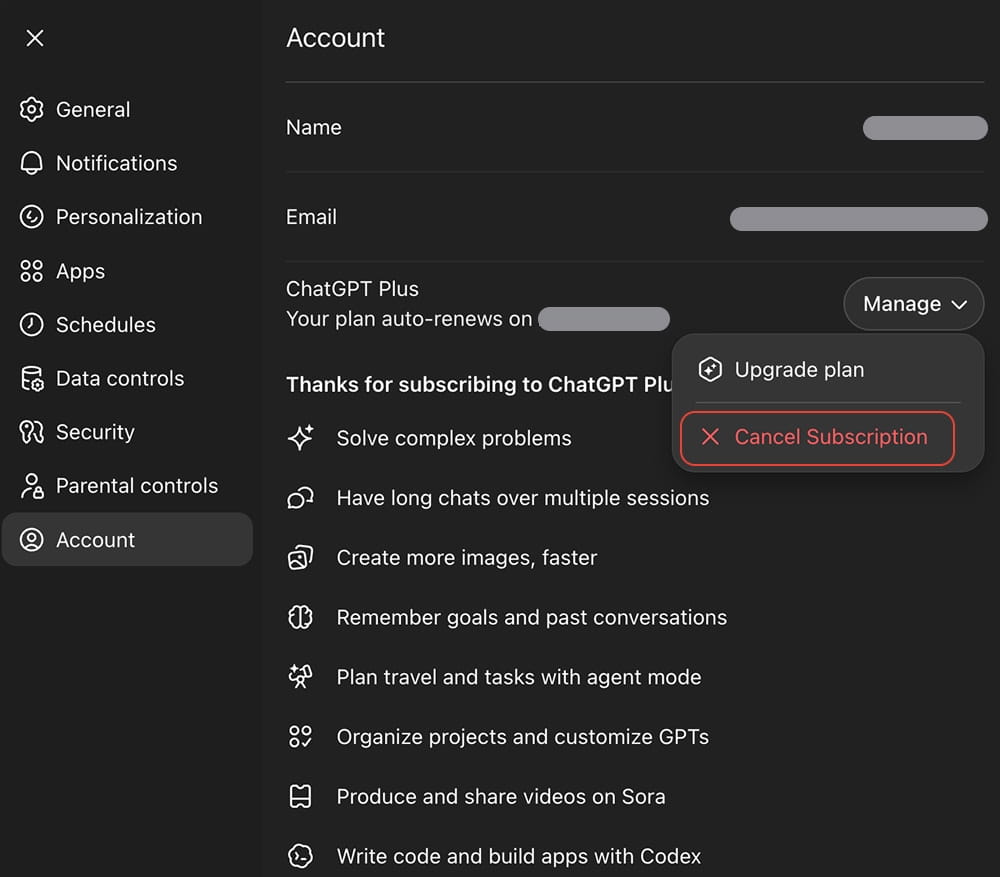
Note: Access remains active until the renewal date.
Cancel on iPhone via Apple subscriptions
Use this if you bought the subscription through Apple.
- Open Settings on your iPhone.
- Tap your name (Apple ID).
- Tap Subscriptions.
- Select ChatGPT.
- Tap Cancel Subscription.
Note: OpenAI cannot process iOS refunds; users must interface with Apple.
Cancel on Android via Google Play
Use this if you subscribed through Google Play.
- Open Google Play.
- Tap your profile.
- Open Payments & subscriptions.
- Tap Subscriptions.
- Select ChatGPT.
- Tap Cancel subscription.
- Follow the on-screen prompts.
Note: Uninstalling the application does not halt charges.
How to confirm the cancellation actually went through
After you cancel ChatGPT, check for at least one of these signs:
- your subscription status shows an end date or expiration date;
- the service says the plan will remain active until the end of the billing period;
- you receive a confirmation email or in-app confirmation;
- on Apple, the cancel button disappears or the subscription shows an expiration notice.
Best ChatGPT alternatives
You need alternatives that do not treat your private thoughts as free training data.
Claude is one of the strongest options for writing, analysis, long documents, and coding support. More importantly, their enterprise tiers offer much stricter data boundaries.
General privacy level: high – claims to never use user inputs to train models.
Gemini makes the most sense if you already live inside Google’s ecosystem. It is often chosen for multimodal work where images, files, and workflow integrations matter.
General privacy level: variable – enterprise is secure; consumer limits history if opted out.
Llama-based tools are the privacy-minded route. Not always the easiest. Sometimes the smartest. Zero internet connection required. Zero chance of a server breach.
General privacy level: ultimate – if you download these open-source models and run them directly on your own hardware, the data never leaves your machine.
Read the comprehensive guide about ChatGPT alternatives.
The 2026 AI Safety and Security Imperative
In 2026, the AI risk question is operational.
The biggest danger is not just bad answers. It is what happens when AI becomes deeply embedded in work, security, and decision-making. The 2026 global safety consensus puts cybersecurity near the top of that threat list: agentic AI can help attackers automate phishing, rewrite malware, probe systems faster, and scale insider mistakes at machine speed. One misconfigured AI agent handling sensitive data can expose far more in minutes than a careless employee could in a day.
There is also a quieter risk: human overreliance. The more people outsource judgment to fluent AI systems, the easier it becomes to miss errors, trust weak outputs, and lose critical thinking habits. That matters in business. It matters even more in medicine, law, and security.
Open-weight models add another layer. Once released, they cannot really be recalled, and safety guardrails can be stripped away. That makes misuse harder to trace and easier to spread.
Then comes the privacy paradox. Many users assume that if they cancel ChatGPT, delete chats, or even delete their account, their data is simply gone. In practice, legal holds and retention obligations can complicate that expectation. For privacy-first users, that gap between what feels deleted and what may still be preserved is one of the strongest reasons to rethink which AI tools deserve their trust.
So before asking only how to cancel ChatGPT subscription, ask a harder question: if you switch, are you moving to something safer or just something different?
What matters now
First, ask whether your prompts are used for model training. If yes, can you switch that off? If no, where is that promise written?
Second, ask where your data lives, how long it is retained, and whether there is a temporary or zero-history mode.
Third, ask whether the tool can be run locally or inside a controlled enterprise environment. For sensitive work, that difference is massive.
Fourth, look at identity friction. Age checks, account recovery, phone verification, ID upload, face verification – these are not small details. They affect anonymity, access, and trust.
Finally, watch regulation. The EU AI Act is already rolling out in stages, with rules for general-purpose AI already applying and broader implementation continuing through 2026 and 2027. That means providers are entering a period where transparency, risk controls, and compliance language matter more than ever.
FAQ
How do I cancel ChatGPT subscription?
If you subscribed on the web, open ChatGPT, go to Settings → Account → Manage → Cancel subscription. If you subscribed through Apple or Google Play, you have to cancel it in that store instead.
How to cancel ChatGPT Plus subscription if I paid on iPhone?
Open iPhone Settings → Apple ID → Subscriptions → ChatGPT → Cancel Subscription. Apple controls the billing in that case, not ChatGPT itself.
How to cancel ChatGPT Plus subscription on Android?
Open Google Play → profile → Payments & subscriptions → Subscriptions → ChatGPT → Cancel subscription. Always double-check the end date after you do it.
Can I cancel ChatGPT anytime?
Yes. You can cancel ChatGPT whenever you want, but your paid features usually stay active until the end of the current billing period rather than stopping instantly.
Will I lose my chats if I cancel ChatGPT?
Usually, canceling the subscription does not erase your chats. Canceling a plan is different from deleting chat history or deleting your whole account.
Do I get a refund after I cancel ChatGPT?
Usually, no automatic refund is offered just because you canceled. Refund handling depends on how you subscribed (directly through OpenAI, through Apple, or through Google Play).
Why can’t I find the cancel button?
Most of the time, you are either logged into the wrong account or trying to cancel in the wrong place. Web subscriptions are canceled in ChatGPT, while App Store and Google Play subscriptions must be canceled in those stores.
What happens after I cancel ChatGPT subscription?
Your plan normally remains active until the billing period ends, then your account drops back to the free tier if one is available.
What is the best alternative after canceling ChatGPT?
There is no one universal winner. Claude is strong for writing and deep analysis, Gemini works well for Google-centered workflows, and Llama-based local tools are the better fit if privacy and control are your priority.
Is AI safe to use after I cancel ChatGPT?
AI can be useful, but “safe” depends on the provider’s training policy, retention rules, identity checks, and whether the system can run locally or in a controlled business environment. Never assume a replacement is private just because it is new or popular.